
Online Spreadsheet Editor for Fast, Easy Data Management
What Is an Online Spreadsheet Editor
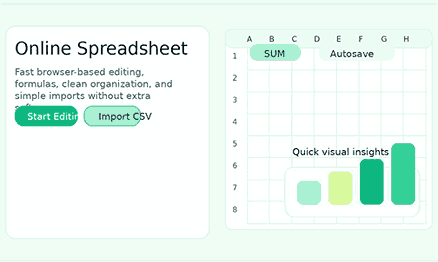
Online spreadsheets allow you to organize, change, calculate, and review data without having to download any software on your computer. Open it on your phone, tablet, or laptop, make some quick changes, and carry on working from nearly anywhere. And that usability is just what today’s users want—and this tool provides it without any unnecessary overhead.
Why the Subject Still Matters
The Change to Work in a Browser
Why People Choose an Online Spreadsheet Editor
Most people don’t want to install additional software only to view a couple of rows of data, alter a list, or fix a formula. They want a tool that feels immediately familiar, quick editing, and an easy-to-use interface. An online spreadsheet solves that by cutting setup time and giving users a direct path to getting things done.
No Installation Needed — Start Instantly
Desktop tools can still be handy, but they might make things more difficult when the work is easy. A spreadsheet on your browser gets you up and running faster and helps you focus. That speed is relevant for students, marketers, operations teams, founders, and support personnel who need to make changes quickly and do not want to put in significant effort every time they work with the data.
You can work from almost any device
A good online spreadsheet gives people freedom. You can review a sales list on your laptop at work, update a task list on your tablet at home, or check numbers on your phone while you’re on the go. The tool consistency also makes it more useful in practice. Responsive, consistent, and simple, even when the size of the screen is different.
Flexible access is important for modern work.
Core Benefits of an Online Worksheet
It feels better to enter data simply
Quick Formulas Cut Down on Manual Work
Importing and exporting keep the tool useful.
Find and Replace is a fast way to tidy up data.
Why Simplicity Wins
- Excel Lite Sheet has a focused interface that makes it easier on your brain.
- Common actions are straightforward to find, reducing unnecessary clicks.
- Performance stays fast, keeping your workflow moving.
- No account required — your data stays private.
Features Users Expect from a Great Online Spreadsheet
People who search for an online spreadsheet usually have a specific task in mind. They want to edit a list, run a quick calculation, or get organized — without installing anything or creating an account. The features below are the ones that actually are relevant for that kind of everyday, practical work.
Formula Help That Feels Like Home
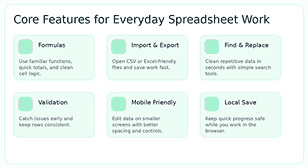
People trust an online spreadsheet with known formulas. They want to be able to use functions, enter in values, and reference cells without reading a manual. Finding the formula bar, reading cell references, and checking results all feel natural from the start. When the interface stays out of the way, users spend their time on the numbers—not on figuring out the tool. That confidence only grows as the work becomes more complex.
Sorting and a well-organized structure
Stopping and checking mistakes
Autosave and Local Progress Saving
Nobody wants to lose work they just spent time on. When a spreadsheet saves automatically or lets you download a local copy, it feels much more reliable to use. That consistency matters—it reduces some of the stress of editing and gives you confidence that you won’t lose your progress.
Controls that work on phones and tablets
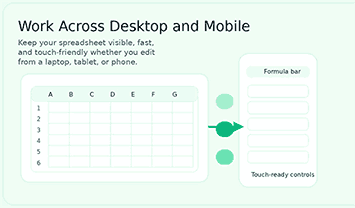
Not every spreadsheet task happens at a desk. People frequently need to check a formula, update a row, or review values while away from their computer. A spreadsheet built for mobile should have clear spacing, tap-friendly controls, and a layout that does not require pinching or zooming just to get things done.
Best Use Cases for an Online Spreadsheet Editor
An online spreadsheet fits naturally into more situations than most people expect. From tracking a monthly budget to managing a team task list, it handles real daily work without being intrusive. Here are some of the most common ways people use it.
Budget Tracking and Expense Planning
A spreadsheet naturally facilitates the management of a monthly budget, tracking side income, planning an event, or monitoring cash flow. Add formulas, set up categories, compare totals, and update figures as new numbers come in. Since this tool runs in the browser, you can check a balance or adjust an entry whenever you need to — no software required.
Making lists of things to do and planning projects
Many teams use spreadsheet-style layouts to manage their tasks. The rows and columns make for easy planning. You can see who owns what, when it’s due, priorities, and how far along you are. A quick online spreadsheet is very helpful if you want to keep things clear rather than add a lot of project management work. It provides users with a structure but does not force them to follow a strict workflow.
Work with Operations and Inventory
Small businesses usually need a simple way of tracking inventory, reordering levels, vendor information, and to-do lists. An online spreadsheet is excellent when you want to edit, search, use formulas, and keep things organized quickly. Even better, teams can pull in data from previous projects, rather than starting from zero.
Schoolwork and Students
Students, teachers, and tutors use spreadsheets to keep track of grades and set up study plans and lists of things to research. A spreadsheet tool that runs in a web browser is a good choice for this situation, as it’s easy to open on shared devices and allows quick changes between classes. A clean interface allows users to concentrate on the content, not on how to use the tool.
Work on content, sales, and marketing
Marketing teams use spreadsheets for campaign trackers, content briefs, lead lists, keywords, and editorial calendars. Sales teams use them to plan outreach and get a quick snapshot of their pipeline. Either way, it’s easy to collaborate in an online spreadsheet, do some light analysis, and adjust the setup as priorities change. That’s beneficial for departments that need to move fast and shift priorities regularly.
How an Online Spreadsheet Editor Can Save You Time
The biggest advantage of a browser-based spreadsheet is how fast it gets you to the actual work. There is no installation, no license check, and no setup wizard—just open the tab and start. Every minute saved at the beginning adds up across a busy week.
Less setup time means faster work
When a spreadsheet opens directly in the browser, users can start right away. That cuts down on the little delays that slow people down all week and saves time at the beginning of each task. People often keep using tools because they make their lives easier.
Cleaner workflows reduce repetition
Moving data between tools, changing names one by one, and fixing the same formatting problem again and again are all a waste of time. A useful online spreadsheet cuts down on that by putting all the common tasks in one place. Formula support, import tools, search actions, and organized editing all make it easier for users to get to the end result with fewer steps.
People can make better choices when they can see better.
A worksheet is more than a place to store numbers. It helps you understand what the data actually means, so you can make faster and more confident decisions. Easy-to-read rows, correct formulas, and quick summaries help people work faster. This is helpful for any workflow needing accurate, clean information, such as operations, finance, and planning content.
Online Spreadsheet Editor Versus Traditional Desktop Spreadsheet
Overall, it’s about what you need to do and whether you want a spreadsheet on your browser or a full desktop program. Both have true strengths, and neither is right for every case. Knowing the difference helps you pick the proper tool without wasting time on setup or features you do not need.
You Have More Options with Desktop Tools
Many traditional spreadsheet programs have deep formatting controls, advanced features, and workflows that can be extremely useful for businesses. That makes sense for people who use a lot of power or do a lot of analysis and spend all day in big workbooks. That depth is critical for some teams. For many other people, it’s too much for what they need to do every day.
Browser tools speed things up and make them easier to find
The whole idea of an online spreadsheet is accessibility, effortless sharing, and usability. For people who want to edit without feeling overwhelmed, use common formulas, access work on the go, and minimize software overhead, a browser-based spreadsheet is often the best choice. Teams, students, independent workers, and start-ups prefer a balance that leans toward speed rather than features.
Tasks determine the best option
The best tool is the one that fits the task, not the one that looks appealing on paper. Desktop software still makes sense for heavy, complex workloads. But for most day-to-day tasks, an online spreadsheet does the job quicker and with a lot less setup.
How to Choose the Right Online Spreadsheet Editor
Not all spreadsheet tools are equally effective. Some users want a clean layout and a quick import; others want more privacy, mobile support, or how well the tool handles formulas. Knowing your priorities will help you pick the right tool, so you don’t have to switch later.
Look for a Clean Interface
The first time you use a good online spreadsheet, you should be able to figure out where to put data, where formulas go, and how to do basic tasks. An overcrowded interface makes mistakes more likely and slows users down. A focused layout helps users stay on track from the start by making the most-used actions easy to find. Simple does not mean powerless. It means that the company is putting more thought into its products.
Check that the files are compatible
People will often clean their data before sharing it here. They might have a CSV file, an Excel export, or a list they’ve taken from another website. Adding and removing files from a good online spreadsheet should be straightforward. Compatibility makes it easier to switch and is more attractive to those who want quick results over a closed ecosystem.
Consider Using Your Phone Early
A spreadsheet may look fine on a computer but not work well on a phone. A good mobile experience starts with intuitive-to-use controls, clear spacing, and editing that works naturally with your fingers.
Think about how private and reliable it is
Users want to be confident that they won’t lose their work by accident. They want saving to be easy to understand, they want editing to be steady, and they want files and data to be handled in a smart way. A tool that is clear about how it handles your data builds trust naturally. For first-time visitors, that trust is often as important as the cool features.
Why This Online Spreadsheet Editor Stands Out
There are many spreadsheet tools available but not all for everyday use. Excel Lite Sheet focuses on the things that matter most—quick loading, clean editing, practical formulas, and reliable saving—so you can get your work done without getting in your own way.
Editing experience that is fast and to the point
This online spreadsheet tool lets you make changes quickly, without interruption. The interface is simply set out with common tasks, so users may switch between rows, change settings, and stay focused. That is relevant for daily work — people come back to tools that feel simple, calm, and responsive.
Built-in formula support for basic math
The tool has helpful formula workflows that let users add up numbers, compare cells, and get results all on the same spreadsheet. That means it’s more than just a table editor. It becomes a useful spreadsheet in your browser for budgets, planning sheets, status trackers, and a lot of other real tasks that need numbers to work.
Tools for quick cleanup, importing, and exporting
Most users arrive with data already in hand—a CSV file, a copied list, or an export from another system. This tool supports that practical flow: import your file, clean it up using find and replace, and export the result in a format you can use right away.
Save your work automatically, check your data, and trust it more.
A good spreadsheet saves your work as you go. Autosave, validation checks, and data quality indicators help you spot issues before they become bigger problems. This principle is especially true when you are working with business records, financial data, or any list that is going to make a direct impact on decisions.
Design that works well on tablets and phones.
How to Get Started with an Online Spreadsheet Editor
Getting started with Excel Lite Sheet takes less than a minute. There is no setup, no tutorial to sit through, and no account to create. Just open the tool, start entering data or import a file, and go from there.
Import data or start from scratch
People generally come to a spreadsheet tool with one of two things in mind: either to start something new or to continue work on data they already possess. You can achieve both these things with an online spreadsheet you can trust. The product is adaptable and useful for beginners as well as experts. Long-time users can modify existing data, while new users can begin from scratch.
Change values and sort rows with formulas
If the sheet is open, users should be able to enter values, add formulas, and sort the data without any problem. The more natural those actions are, the faster people will trust the product. This is why an editing spreadsheet should have controls that are simple to use and a layout that makes sense.
Save or export your work
When the editing is done, people want an easy, dependable way to save their work. Export options and local saving and clear progress feedback all help with that. All these features together tell you that the tool is made for real work — not just quick edits, but full jobs from start to finish.
Who Can Benefit Most from an Online Spreadsheet Editor
Spreadsheets are one of the most versatile tools you may have in any process. Whether you are a student, a freelancer, a small business owner, or part of a growing team, the core use cases stay familiar—organize, calculate, track, and share. Here is a closer look at who finds this tool most useful.
Independent workers and freelancers
Freelancers often need a simple tool to help them write proposals, keep track of their tasks, and plan their work. An online spreadsheet meets those needs because it is quick and easy to change. It helps people who work alone plan their work without having to deal with complicated systems that take longer to run than the work itself.
Small Groups and New Companies
Lean teams need to be quick, clear, and adaptable. They need tools that let them test workflows, keep track of information, and share updates quickly and easily. A spreadsheet that works in a web browser makes it easier to do things because it lowers the barrier to action.
Students, researchers, and educators
Students frequently require a quick way to create lists, compare numbers, and construct simple trackers. A clean online spreadsheet is a good choice for that because it’s easy to get to, you know how to use it, and you can access it from different devices. It helps with real work without making things too difficult.
Security and Trust Matter on a Spreadsheet
Trust is earned, and even the simplest spreadsheet tool has to be trusted. Users want to feel that they can easily save their changes and that the tool will always perform. That confidence is what keeps people coming back to the tool.
Editing that stays the same builds trust.
Reliability is a part of the experience of the product. When users can navigate the sheet, alter it, and track their progress without any surprises, they feel confident investing their time with the tool. That kind of consistent performance develops confidence and keeps users coming back.
Clear savings habits reduce stress
People want to know what will happen to their work. If the program autosaves or permits a local download or has a clear export path, understanding the alternatives up front takes the guesswork out of the process. That clarity makes the experience easier and makes new users feel confident from the start.
Final Thoughts on Choosing an Online Spreadsheet Editor
The best online spreadsheet is the one that helps people get things done. It should open fast, be easy to understand from the first click, support practical formulas, and make it easy to manage data on all your devices. That’s what people really want when they search for this sort of thing.
Try Excel Lite Sheet Today
Choose clarity over complexity: open the Excel Lite Sheet, complete your project quickly, and save time each week. Excel Lite Sheet is a straightforward choice for quick, browser-based spreadsheet work.
Frequently Asked Questions About Online Spreadsheet Editor
Can I use an online spreadsheet without having to download anything?
Yes. Users can open and edit a real online spreadsheet right away in their browser without having to install any desktop software. That makes it easier to reach and use on a variety of devices.
Can you use formulas in a spreadsheet on the web?
You can solve everyday math problems like adding up values, comparing cells, and more with a good online spreadsheet. Formula support transforms the tool from a simple grid into a real workspace, making it more useful.
Is it useful to have a spreadsheet on your phone?
Yes, as long as the interface works well on smaller screens. For mobile usability, it’s critical that controls are easy to touch, there is clear space between them, and editing actions are easy to see.
Can I import data in CSV or Excel format?
This is one of the most-requested features, and it’s one of the main reasons to use a spreadsheet tool online. Import support makes it effortless for users to work with files that are already there instead of having to rebuild data by hand.
Who should use an online spreadsheet?
An online spreadsheet is useful for freelancers, students, small teams, marketers, operations staff, teachers, and anyone else who needs to quickly change data in the browser. It is especially useful when speed, flexibility, and convenient access are more important than how complicated a big business is.