
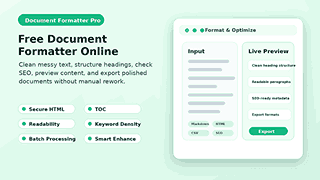
Free Document Formatter Online
Formatted output appears here
Paste content and click Format & OptimizeRun Format or Full Audit to see report
Free Online Document Formatter
Use Document Formatter Pro to clean up the chaotic text, making it neat, structured, and ready for publication. The tool formats Markdown, HTML, CSV, JSON, XML, textiles, and plain text for you, so you don’t have to waste your time manually editing them.
This free online document formatter should be so much more than a space remover plus. It will help you to structure better, keep your clean markup safe, show useful content analytics, and export the end result in the format that you need.
All in one place: format, clean, and optimise documents
Document Formatter Pro is a faster way for writers, bloggers, students, marketers, and developers to polish their content. Copy and paste your text, select the correct input type, run the formatter, and review the output in a live preview.
The tool supports common writing and data formats, so you don’t need separate utilities for every small task. Clean text, improve headings, create a table of contents, check SEO tips, and export your work in one interface.
Why Messy Text Is An Actual Problem
Poor formatting delays publishing. Extra line breaks, incorrect headings, broken lists, dirty HTML, and inconsistent spacing make content harder to read and harder to manage.
Hidden styles are often copied along with content on the web, emails, PDFs, word processors, and AI writing apps. These styles can break layouts, create invalid markups, or make a simple article look unprofessional.
A proficient online document formatter will resolve the issues before publishing them on your website, blog, email, or documentation system. It gives you cleaner output and saves you time to resolve the same issues manually.
What Is a Document Formatter?
This text formatter online is a tool that takes raw or unstructured content and formats it into something a little cleaner and more readable. It can also clean and format headings, generate HTML, improve plain text, and let you skim long articles.
An online tool for formatting documents of various kinds is called Document Formatter Pro. In a single workspace, it performs writing, markup, data snippets, and even SEO-friendly formatting.
It translates raw text into structured output
Raw text often doesn’t have clear structure. A formatter cleans up space, improves headings, preserves lists, and prepares content for preview or export.
This means that the final document is easier to read and use. With a few clicks you can go from rough notes to polished output.
Keeps Your Content Consistent
When you publish articles, reports, documentation, or client content, consistency matters. A document formatting tool helps make headings, paragraphs, links, and exports more predictable.
The uniformity also makes it easier to edit. You can easily see where your content needs a stronger headline, better spacing, or cleaner structure.
Who Needs Document Formatter Pro?
If you do a lot of text processing, a free online document formatter can be very handy. This is the best solution for users who want to have a clean version of the copied content from different sources in a short time.
Website Owner and Blogger
Bloggers can use the tool to edit drafts, format headlines, count words, analyze keyword density, and prepare content for publication. “Moving content from notes or AI drafts or document editors into a CMS saves time.”
Content Writers and SEO Content Marketers
The formatter can help SEO writers produce cleaner articles with better heading flow and more readable paragraphs. The SEO card helps you draft a meta title, a meta description, and a focus keyword as you write.
Students & Researchers
Students can clean up copied notes, create outlines, and turn plain text into readable documents. Researchers claim that reviewing rough material before adding it to a report or study file can simplify the process.
Technical Writers and Developers
Developers can format Markdown, HTML, JSON, XML, and CSV snippets with us, eliminating the need to juggle between several browser tools. Technical writers can review structure, clean markup, and export documentation-ready content.
Social Media and Email Team
Marketing teams can check the character limits for X, LinkedIn, and Instagram before posting. They can also clean up content for emails, landing pages, and campaign drafts.
Supported Input Formats
Besides text, a free online document formatter product has other requirements. It supports different types of content, like text, images, and tables, so different users can work in the format that best fits their tasks while improving teamwork and usability.
Markdown
It’s popular for documentation, notes, tech writing, and developer content. The formatter will help you better structure your markdown, making it cleaner but still readable, with sections, lists, and links.
HTML
HTML can get pretty messy when copying from websites or editors. Document Formatter Pro cleans HTML, removes empty tags, tidies external links, and gets markup ready for cleaner publishing.
Plain Text
Plain text is useless until it has structure. Clean up extra spaces, correct line breaks, improve readability, sort lines, and get the text ready for articles, emails, scripts, or reports.
CSV content is difficult to read because of its rows, quotes, and columns. This tool is designed for easier previewing or conversion of CSV input to some other format.
JSON & XML
JSON and XML are important for data, feeds, configuration, and technical content. A formatter makes these structures easier to view before you copy, save, or share them.
Fabric
Textile support is another lightweight markup language designed for users. This is straightforward for those working with legacy content systems or other writing formats.
The core features that make formatting easier
This online document formatter integrates formatting, content cleanup, SEO checks, live previews, utility actions, and export options in one clean interface. “Each feature supports a real publishing or editing task.
Format Optimise
The Format and Optimize button will process your input and yield a cleaner output. It helps you move from rough text to organized content without having to rebuild the document line by line.
Smart typesetting
Smart typography improves the look and feel of written content. It fixes formatting issues that improve the flow of text and make the content look more polished.
SEO Titles
SEO headings can help your content follow a clearer heading structure. Strong headings help make it much easier to scan long content and provide search engines with more context about each section.
Secure HTML
Secure HTML cleans up messy or dangerous HTML markup before you use it. This is useful if you are pasting from unknown sources or copying code from different editors.
External Link Tidy
ExternalLinkTidy changes the behavior of outgoing links in formatted content. It helps editors create safer and more consistent HTML output by taking care of clean links.
Empty Tags: Clean
Empty tags add clutter and can even lead to confusing markup. The formatter also removes unnecessary empty elements, so the output is more concise and easier to work with.
Auto Link URLs
Automatically makes web addresses clickable. This feature proves beneficial for converting notes, references, or web sources into functional links.
Auto SEO
Auto SEO has basic on-page optimization. It helps you prepare metadata, check SEO tips, and improve your content structure before publication.
Minify HTML
Minifying HTML reduces extra whitespace in markup for a smaller output. This feature is useful when you want compact code for storage, for testing, or for publishing:
Dark Preview
Dark Preview gives you a preview of how content looks in a darkened reading environment. This lets you locate issues with contrast, space, and readability before users do.
Content Analytics for More Effective Decisions
Good formatting is about more than looks. The document formatting tool also provides content analytics, allowing you to learn more about the quality and structure of your text.
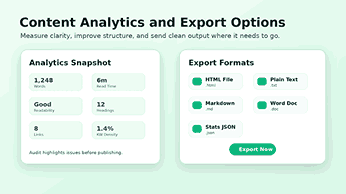
You can check the words, characters, sentences, reading time, readability, grade level, headings, links, paragraphs, and keyword density. These numbers let you edit with purpose, not just guess.
Word Count & Character Count
Word count is required to meet the word count goals. Character count is a great tool for writing short copy, meta descriptions, social posts, and tight ads.
Time to Read
This feature provides visitors with a quick way to see the reading time for content. This tool allows you to see how long an article is or how short.
Readability and Grade Level
Edit for clarity. Tests for readability. A good article should have short paragraphs and use plain language. Use section headings to help the reader navigate your topic.
Count of Links and Headings
Head count helps you verify structure. The link count lets you verify references, internal links, external links, and supporting resources before publishing.
Keyword Density
Keyword density indicates whether you have used your focus keyword naturally. You can check density before you publish so you don’t end up with weak targeting or keyword stuffing.
SEO Optimisation Tools Built-In
This tool helps you format your documents online for free. An SEO card includes metadata and planned target keywords. This can be used for services, landing pages, tools, and blogs.
Meta Title Field
You can use the meta title field to keep the search title to a practical length. A well-defined title can improve click-through when it matches search intent and explains the tool in a concise way.
Meta description box
The meta description field is for writing a short summary to convince people to click. Good descriptions should mention the tool’s main benefit, the formats it supports, and why you should try it.
Field of Focus Keyword
The focus keyword field lets you see your target phrase as you format your document. The tool is related to the main keyword ‘free document formatter online’ as it satisfies the search intent of users that are looking for a free solution that works in the browser for formatting.
SEO Tips
The ideas can help you identify missing or weak optimization elements. They assist with the length of titles and descriptions, how to structure content, and what keywords to use.
How to Use Document Formatter Pro
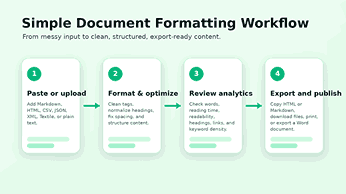
No complicated setup, just use Free Document Formatter Online. The workflow remains simple, so you can focus on improving the content, not learning another complex editor.
Step 1: Select Input Type
Click the format that matches your content type—Plain Text, HTML, Markdown, JSON, XML, or CSV.
Step 2: Upload or paste content
Upload a file with a supported extension, or paste in your text. The interface is big enough to accommodate longer content and structured snippets.
Step 3: Choose Processing Options
Select the options you desire. Features: smart typography, ToC generator, SEO headings, secure HTML, external links, clean empty tags, auto-SEO, auto-link URLs, minified HTML, dark preview.
Step 4: Select Format & Optimise
Get your materials ready and clean them up with the formatter. The live preview allows you to see how the results will look (what the formatted output will look like) before you copy or export it.
Step 5: Conduct an SEO and Accessibility Audit
Start the audit to identify any issues. Here you can edit headings, readability, links, metadata, and the structure of your content before publishing.
Step 6. Export the Final Results
Make a copy of the HTML or Markdown. Obtain a printout of the outline. Export to HTML, plain text, Markdown, Word doc, or Stats JSON. Choose the format that works best for your next step.
The document formatting workflow includes pasting, formatting, reviewing, and exporting.
Useful Utilities In The Tool
The free online document formatter has quick tools to solve everyday text problems. These small utilities save you from having to open separate sites for simple conversions.
Copy HTML, copy Markdown
Easy copy buttons make it effortless to pull the final output into your CMS, editor, email tool, or documentation system. Once the formatting is done, it will speed up the workflow.
Search & Replace
Find and replace allows you to change recurring words, phrases, symbols, or patterns. Power users have more control, with the ability to use regex to make larger edits, such as replacing multiple instances of a word or phrase throughout an entire document.
URL Encoder / Decoder
The URL utility is useful for encoding and decoding links, query strings, and websafe text. It’s excellent for technical and SEO issues, such as clean URLs.
Convert Case
The case utility is a useful tool to convert between common casing styles of text. This is useful for cleaning up headings, labels, lists, and titles.
Base64 Tool
The Base64 utility safely encodes and decodes text. It supports Unicode content, which makes it more reliable for modern text.
Slug Maker
Slug generator creates clean URL slugs from the titles. A readable slug lets users know what the page is about before they click on it.
Sort Lines and Clean the Text
‘Clean Text‘ removes junk from pasted content. SortLines helps you sort lists, keywords, rows, or duplicate entries in a cleaner order.
Clear Button
To start over, tap the Clear button to reset the work area. It keeps the interface fast and simple for repetitive format jobs.
Why Choose Free Document Formatter Online?
Other tools require you
- Register
- Bog you down with features you don’t need,
- Just grammar.
- Some don’t even repair the structure.
This one is easy. It does do one thing right, though: it cleans up and structures your content in a hurry.
Batch Processing of Repetitive Tasks
Batch processing is useful if you want to format or clean up several items at once. You can process a list without having to edit each item manually. You can add one item per line.
The “Remove Duplicates” option helps you quickly clean up lists. It works exceptionally well with lists of keywords, URLs, titles, names, labels, or copied spreadsheet values.
Table of Contents Generator
For long content, a well-structured table of contents will help readers to navigate easily. It can also produce a table of contents for the headings so that readers can more quickly navigate the structure.
This TOC (Table of Contents) helps editors obtain the flow of content. If the table is difficult to read, the article probably needs better section names or clearer headings.
Live Preview for Enhanced Editing
Preview live and see the formatted output before you export. It helps you catch spacing problems, heading issues, broken lists, or weak structures early enough to fix them.
The preview controls allow responsive previews, prints, and full-screen reviews. These controls help make it easier to judge how content will feel to real readers.
Flexible Publishing Export Options
Various files are required for different tasks. Document Formatter Pro provides a variety of export options so you can keep the same workflow for multiple publishing needs.
HTML document
Exports give you clean, well-structured markup that’s ready for the web, blog, CMS, or passing to developers. HTML output allows you to structure your content in your web projects and achieve consistency with the ability to customize or integrate.
Plain Text
Save as plain text for a clean, distraction-free version. Perfect for emails, scripts, notes, data cleansing, and simple documents.
Markdown exports when you write for GitHub, documentation, notes, static sites, or markdown-based editors. It keeps the simple editable layout.
Word Doc
Convert to Word document. You want to produce content that targets editors, teammates, instructors, and clients. This feature also bridges browser formatting and document review.
Stats JSON
Statistics can be exported in JSON format to allow structured content analysis. This can be useful for reporting, auditing, or workflow automation.
Why This Tool is Better Than a Simple Text Cleaner
A simple text cleaner would remove spaces, tags, or line breaks. Document Formatter Pro adds to that with formatting, SEO support, analytics, previews, batch processing, utilities, and export options.
This additional feature set gives you a true editing workspace. You can clean the content, measure it, improve the structure, and prepare the final output without having to jump between tools.
It Supports Additional Formats
Most text tools only work with one format. Document Formatter Pro is useful for mixed workflows since it supports written formats, markup formats, and data formats.
It Shows More Helpful Statistics
Writers need more than a neat block of text. The analytics panel provides useful numbers that will help you fine-tune your readability, length, headings, links, and keyword usage.
It Helps With Publication
The export options help make the tool useful after formatting is complete. You can export the results to a website, editor, document, or reporting workflow.
Practical Applications of the Tool
This free online document formatter is particularly useful for a lot of content work. Great for quick clean-ups, deep edits, SEO prep, or last-minute checks before you publish.
Draft a Neat Blog Before Publishing
Copy a blog draft, normalize headers, check paragraphs, review keyword density, and copy the final HTML. This makes it easier for you to publish cleaner articles with less manual editing.
Drafts Generated by AI
AI drafts usually need a bit more structure and spacing. You can paste the draft, run Smart Enhance, check the headings, and change the output before you publish.
Website Content Creation
Readers scan. Website copy needs a clean structure. Use a formatter, a tool that helps organize texts, to create stronger sections, shorter paragraphs, and more consistent headings.
Get clean HTML from editors
Word processors and visual editors can put in extra markup. Secure empty HTML tags and prepare cleaner code for a CMS or website.
Metadata for SEO Review
Create a clear title, description, and focus keyword for the SEO card. Then, analyze the content for keyword density, heading structure, and readability.
Sorting Lists and Data
Dump removal, sort lines, batch processing Cleaning keyword lists, content ideas, URL lists, basic data rows, etc. can speed up planning and editing.
Best Practices for Correct Document Formatting
The ideal formatter is a blend of automation and intelligent editing. Remove the repetitive work with the tool and read the content like a real reader.
Use One Clear ‘H1’
This section provides a quick explanation of the topic mentioned in the main title. Free Document Formatter Online is the clear best match for the primary search intent for this page.
Specific Sections of H2
H2 headings for big concepts Headings help the reader to skim through the article faster and also help search engines understand the scope of the content.
Details: Use H3 headings
H3 headings are for features, steps, use cases, and smaller points. This helps to avoid long chunks of text and to keep the structure of the article.
Keep Paragraphs Brief
Short paragraphs work well for readers on mobile and desktop devices. For busy users, the ability to quickly read short paragraphs and get the main points without scrolling through long text is a benefit.
Use the focus keyword naturally
The focus keyword is present in the title, introduction, headings, meta description, and body paragraphs. Do not artificially repeat it.
Please verify before exporting
Always review the live previews, analytics, SEO hints, and audit results before exporting. This final inspection allows you to catch small problems before they go public.
Begin with Cleaner, Faster Formatting
This tool allows you to clean, format, analyze, and export your content all in one workspace. It helps you to take rough text and polish it off without the slow manual editing.
This free online document formatter is the perfect solution for anyone who wants better structure, cleaner markup, export-ready content, and helpful SEO checks. In this invention, the word “comprises” means that the invention includes the stated features and does not exclude others.
Frequently Asked Questions
What is the best free online document formatter available?
The best free online document formatter must have the ability to clean text, support multiple input formats, have a live preview, check for SEO, and then export the final document. Document Formatter Pro has these features in one simple interface.
Can I format Markdown with Document Formatter Pro?
Yes. Choose Markdown as the input type and paste your content in; format it; see a preview; and export or copy the cleaned output.
Does this tool clean HTML?
Definitely. Options include ‘Secure HTML,’ ‘Cleaning External Links,’ ‘Clean Empty Tags,’ and ‘Minify HTML.’ These features help you produce cleaner markup for publication.
Does the tool help with SEO?
Yes. Document Formatter Pro includes a meta title, a meta description, a focus keyword, SEO hints, keyword density, a heading count, a link count, and an SEO audit area.
How do I export my formatted document?
Yes, you can export it as HTML, plain text, Markdown, a Word doc, or Stats JSON, and you can copy HTML or Markdown directly from the interface.
Does it support CSV, JSON, XML, etc.?
Absolutely. The tool accepts CSV, JSON, and XML. It is therefore ideal for content editors, developers, data workers, and technical writers.
Does it work for long text?
Truly. Use it for articles, reports, documentation, notes, lists, and lengthy drafts. The analytics and table of contents features make it easier to manage longer content.
Is Document Formatter Pro mobile-friendly?
Yes. The new interface features a responsive layout, clear spacing, and touch-friendly, rounded buttons so that users can format content for smaller screens.