
Grade calculator with weights (Advanced & Accurate)
| Assignment Name | Score Earned | Total Points | Percentage | Action |
|---|---|---|---|---|
| — |
| Category Name | Weight (%) | Grade (%) | Weighted Points | Action |
|---|---|---|---|---|
| — |
| Letter Grade | Min % | Max % | GPA (4.0) | GPA (5.0) |
|---|
Grade Calculator with Weights, GPA, and Final Exam Planning
A good grade calculator with weights should do more than 1 percent. It should tell where a student is now, how much of the course still counts, and what score it will take to reach the next goal. This weighted grade calculator combines those answers into one simple tool for assignments, weighted categories, final exams, letter grades, and GPA-style results.
It can be used by students for quick checks before class, for deeper planning before finals, or for regular progress tracking throughout the term. Teachers, tutors, and parents can also use this tool to explain grade outcomes without turning the process into a long math lesson.
Why this grade calculator is better than a simple score calculator
Most students don’t come in with a perfect spreadsheet. They have quiz scores, project marks, exam weights, and missing categories. They have a target grade. A good academic calculator should be able to handle that real situation. This tool supports points-based grading, weighted grading, final exam planning, custom letter grade bands, and GPA conversion on 4.0 and 5.0 scales.
It also features useful workflow features that help make the experience more seamless. Users can load sample data, export a backup, import a backup, clear saved work, copy a summary, print results, save a PDF, switch display mode, and keep progress automatically without signing up.
What students can compute
A grade calculator with weights is useful for a couple of common academic questions. Students can see an overall percentage of earned points, calculate a weighted course average by syllabus categories, preview needed scores on a final exam, test expected outcomes, and customize the grading scale to school policy.
- Points-based grades: Enter the names of assignments, scores earned, and total points to see percentages and an overall grade.
- Weighted category grades: Add homework, quizzes, labs, projects, exams, participation, or any custom category with its own weight.
- Final exam Goals: Enter your current grade, the grade you want, the weight of the final, and how well you think you’ll do on it to see your options.
- Letter grades and GPA: Use editable bands to convert percentages to letter-grade results and GPA-style values.
- Results saved and exportable Copy the summary, print the result, save a PDF, or back up the data for later use.
Basic grade calculator for points-based classes
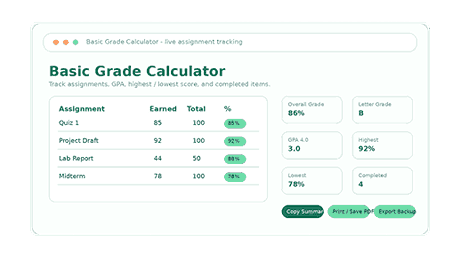
The basic section is most effective with a points-earned/total-points course. The user enters each assignment, quiz, test, lab, or project and then enters the score earned and the total points possible. The calculator shows the percentage for each row and builds a live snapshot of the course based on the data.
This enables students to pick up patterns early. A bad quiz score, a missed assignment, and one great project are immediately obvious. The grade calculator with weights also shows completed items, average assignment score, highest score, lowest score, overall grade, letter grade, and GPA values, so users can view the result from multiple perspectives.
Weighted grade calculator for category-based courses
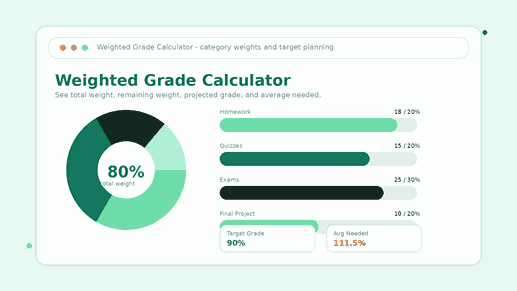
Weighted grading is often the most confusing because not all categories are worth the same amount. Homework might be 15 per cent, exams 40 per cent, participation 10 per cent, and the final project 20 per cent. That structure cannot be explained by a simple average.
The weighted grade calculator solves that problem by combining each category score with its weight. Includes total weight, remaining weight, entered category average, estimated course grade, current weighted grade, letter grade, and GPA-style conversions. It also computes the average remaining weight needed to reach a desired course grade.
This result for the residual weight is especially beneficial Even a student with a satisfactory present grade might feel safe, but a large final exam can still alter the outcome. The open weight makes the risk more obvious and turns the guesswork into a workable study plan.
Final grade calculator for exam-season planning
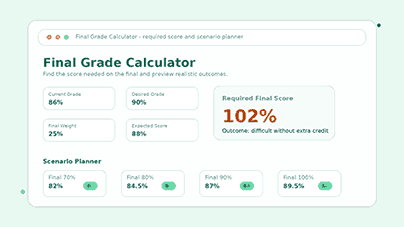
During finals, students typically want one simple answer: What grade do I need on my final? This tool answers that question using the current grade, desired grade, and final exam weight. Then it displays the final score needed and the corresponding letter grade of that target.
The expected-score projection introduces a further layer of planning. Students can type in a likely final score and see the projected course grade prior to the exam. The scenario planner also allows comparison, as it shows the effect of different final exam scores on the end result. This makes the study planning more realistic and less emotional.
Grade formulas explained in plain English
Formula for a basic grade
In the case of grading by points, sum up all the points obtained, divide by the total number of points, and multiply by 100. If you scored 180 points out of 200 points, that’s 90 percent.
Weighted grade equation
For weighted grading, multiply each category grade by its category weight and sum the weighted values. A 40 per cent category has more influence on the course than a 10 per cent category even if they both have similar percentages.
Final exam formula
The calculator considers your current grade and the final exam weight to compute the score you need on the final to achieve your desired course grade. The result indicates if the goal is realistic and what range of performance will change the outcome the most.
Custom grading scale for letter grades and GPA
Schools don’t always have the same cutoffs for letter grades. Some courses have plus and minus grades, some have a stricter A range, and some convert percentages into GPA values differently. The custom grading scale solves that problem by allowing users to edit grade bands, min and max percentages, 4.0 GPA values, and 5.0 GPA values.
A preview percentage field allows users to test the scale instantly. This information is important because a percentage is only a part of the result. Students often need to know what that number means as a letter grade and how that translates to GPA-type language.
How to use the calculator for everyday classes
1. Select the grading method that corresponds to the syllabus
Basic calculator (use when the course is based on earned points and total points) If you have categories with percentages in your syllabus, use the weighted calculator. Use the final grade calculator when the next major result is a final exam, final project, or remaining assessment.
2. Read results after entering scores correctly
Small input errors can cause the average to be misleading. Students should enter each score exactly as it appears on the grade portal or syllabus. – Enter points-based classes earned and total points. For weighted classes, enter each category score and the category weight to the right.
3. Current weight and remaining weight are checked
A current grade is beneficial but it’s not the entire story. The remaining weight indicates how much of the course is still open to change. The calculator helps students plan ahead for a big exam or project that looms, so they are not caught off guard at the last minute.
4. Use target planning before finals week
Target planning provides students a tangible score to aim for. The calculator can tell you if a target is already safe, reachable, or hard without any further help. That information can help students decide how to plan study time and when to ask for help.
Common grading mistakes this tool helps users avoid
Error 1: mixing weights and points
A 20-point quiz and 20 percent exam weight are not the same thing. The calculator differentiates between points-based inputs and weighted category inputs so that students can select the correct method and avoid a distorted average.
Mistake 2: overlooking ungraded work
Even a strong current grade can be dangerous if a large portion of the course is still open. The remaining-weight result helps students see how much can still move and why it is important to plan ahead.
Error 3: thinking that a target is impossible or a sure thing
Many students guess rather than calculate. Some stop too soon; others feel safe without checking the numbers. The final grade calculator, instead of those assumptions, provides a direct target score and realistic outcome comparisons.
Who should use this grade calculator
It is not tied to one narrow grading method and is a useful tool for many academic situations. This tool is not limited to a single grading method, making it useful in a variety of academic situations. It’s good for middle school, high school, college, online courses, tutors, and adult learning programs. It’s good for middle school, high school, college, online courses, tutors, and adult learning programs.
- High school students: Be more confident that you are on track with homework, quizzes, projects, participation, and exam categories.
- College students: Simulate heavy exams, labs, midterms, and final projects before one assessment shifts the course average.
- Online students: Stay accountable after every module, quiz, milestone, or self-paced assignment.
- Tutors and teachers: Show category weights, final-score needs, and GPA conversion in easy-to-see visuals.
- Parents: Find out how your child is doing in class without having to navigate a confusing grade portal.
How this calculator helps students improve grades
The grade calculator with weights is no mere measuring device. It helps students to decide what to do next. Knowing the current average, the remaining weight, and the score needed on a final makes it easier to build a study plan around the categories that matter most.
Students should focus on the high-impact categories. If tests matter more than assignments, then we should increase study time. If a student’s quiz scores are bringing down the average, they can set a specific goal for that category rather than a vague goal such as “do better.”
The results are more useful if they are updated often. It’s a live academic dashboard as students add each new quiz, test, or project to the calculator. It shows whether progress is getting better, staying flat or sliding as the term comes to an end
Why students trust a simple calculator like this
If a tool saves time, clears up confusion, and provides actionable results, students will return to it. This calculator builds trust by providing real-time updates, editable grading rules, clear outputs, auto-saving, export options, a mobile-friendly design, dark mode, and a clean, distraction-free experience.
Clarity is the best of all. Users don’t need to know every formula to receive help. They can enter the numbers, see the result, and then use the explanation to understand why the number changed.
Frequently asked questions
Is this grade calculator right?
Yes, it gives a reliable estimate when the user enters correct scores, weights, and grading scale rules. The tool uses standard formulas for points-based averages, weighted category averages, and final-exam planning.
Does it apply to classes with weights?
Yes. Users can create categories, create weights, enter grades, see how much weight is left, and calculate a projected course grade without doing the math by hand.
Can I use it as a final grade calculator?
Yes. Enter your current grade, desired grade, weight of the final exam, and your expected final score to see what you need for a final score and projected course outcome.
Can I modify the grading scale?
Yes. The grading scale is adjustable for course or school policy. User-configurable letter grade bands, percent ranges, and GPA-style values.
Can I share or export my results?
Yes. The tool allows you to copy a summary, print it, save it to PDF, export a backup, import a backup, clear saved data, and save progress automatically.
Does it work on the mobile?
Yes. The clean interface is built to work smoothly on phones, tablets, laptops, and desktop screens.
Is it just for college students?
No. It works for high school students, college students, online learners, teachers, tutors, parents, and anyone who manages points, percentages, or weighted categories.
Calculating Grades Manually
Then divide the points you earned by the total possible points to find your final grade. Then multiply the answer by 100. Assign a weight to each category. Then add the results for a weighted grade. Use Khan Academy. If you really want to get into the basics of grading, it’s a good resource.
Use this grade calculator with weights to plan your next move
A useful grade calculator with weights doesn’t just tell you how you’re doing now. It helps students decide what action to take next. It has assignment tracking, weighted categories, final-exam goals, scenario planning, GPA calculations, editable grade buckets, and export options—all to help students see a clearer path from ‘what if’ to ‘what next.’
Check out more useful tools on NexezTool for your academic assignments or performance tracking
For example,
- Review and enhance your professional profile with the Free Personal Branding Calculator.
- The Salary Calculator helps you better understand your salary, deductions, and take-home pay.
- Check your progress, as you do with our inflation calculator to track financial change.
Professionals, contractors, and students can use these resources for help. They help people decide about education and work. Their format is straightforward and simple to use.