Salary Calculator For Net, Gross and CTC

Salary Calculator Overview

The Salary Calculator lets you see your salary, deductions, and take-home pay more clearly. No need to switch between spreadsheets or rely on guesswork. We simplify complex pay numbers into a clear, easy-to-read format from the start.
 
Most people don’t struggle because pay is difficult to understand. The problem is that pay slips, offer letters, tax rules, and company structures all use different terms. One document lists gross salary. Another shows yearly CTC. A third discusses employer contributions. But the real question is, how much money actually goes into the bank account, and why?
 
This app gives you a practical answer. Compare your earnings, deductions, net salary, tax impact, and employer costs in one place. Planning a job change, negotiating an offer, checking for a raise, or reviewing a salary structure all become easier.

How the Calculator Works

We calculate gross pay, net pay, CTC, employer cost, and salary hike scenarios based on your pay details, selected country/region, and editable deduction settings.

Select the mode you require. The tool calculates gross to net salary or the reverse to find the gross amount needed for your desired in-hand salary. It also provides an option to break the CTC or compare the salaries before and after the increment.

The tool also explains the basic salary terms used in the calculation.

  • Gross is what you make before you take anything away.
  • Net pay is what you actually make after taxes and deductions are taken out. It is called net pay or take-home pay.
  • CTC is the cost to the company, which includes salary, benefits, and employer contribution.
  • Deduction for employee’s tax, provident fund, pension, insurance, or custom.
  • Employer contributions are costs paid by the employer and may not directly increase your monthly take-home pay.

Assumptions and disclaimer

These results should be used only as estimates for planning and comparison purposes. This salary structure is based on the employer, the country, the contract, the benefits, the tax year, the filing status, and the local rules.

The calculator can be based on editable assumptions for tax, provident fund, employer contribution, professional tax, or regional deductions. Always compare final figures to your official payslip, HR department, employment contract, payroll provider, or local tax authority.

This tool is not intended to provide legal, tax, payroll, or financial advice.

Understand your salary, simplified

A salary may look simple, but the details complicate it. One figure changes when you add basic pay, HRA, allowances, bonuses, PF, taxes, social contributions, and benefits.
 
The Salary Calculator adds up all these details, helping users understand exactly how each part of their salary affects their final pay, without needing to do the math. It clearly lists sources, deductions, and leftover money, demonstrating how each component impacts your take-home salary.
 

View gross salary and take-home pay side by side.

The tool clearly separates gross and net salary, letting users see how inputting each component directly impacts the pay before and after deductions.
 
This matters because many judge an offer by a single number, not realizing that a large package can actually result in lower take-home pay. The calculator reveals this impact upfront, helping you avoid surprises in your finances.
 

Read the annual CTC in clear terms.

CTC may seem appealing, even though it can be difficult to understand. People want to know about their take-home pay, employer contributions, and monthly pay.
 
The calculator breaks down yearly CTC and makes the impact clear. It shows employee and employer parts, monthly and yearly, so you see how each component influences regular income.
 

Plan naturally between monthly and yearly goals.
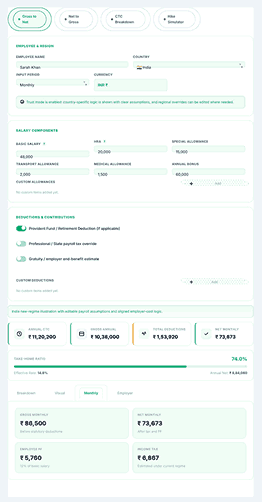
People see pay as monthly for budgeting or yearly for comparison. This tool bridges these views.
 
The salary calculator links monthly income and annual pay, showing how changes in one affect the other. This helps you better evaluate offers and reviews and plan your personal finances.
Salary Calculator dashboard showing salary modes, country selection, income fields, and salary breakdown summary Title: Advanced Salary Calculator Dashboard

Cleaner than manual salary sheets

A spreadsheet can be useful, but it needs the right formulas and tax logic. Careful formatting is crucial. A single error can alter the outcome and mislead about affordability, savings, or income.
 
Salary Calculator resolves that problem. It puts logic into its interface. The layout is easier to read than a grid. The results are easier to explain to clients, employees, candidates, or family members.
 
Short, clear sections help people avoid common compensation mistakes. Many forget to separate what employers pay from deductions. Some think of the annual bonus as a monthly number. Others miss the gap between stated and actual take-home pay. A focused calculator reduces that confusion.
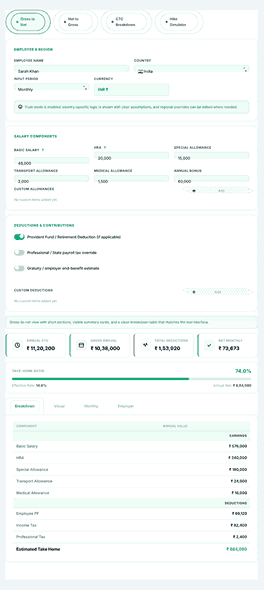
Gross to net salary breakdown showing gross pay, deductions, taxes, and final take-home salary

Gross to net salary calculation that feels straightforward

Most people need gross-to-net first. It starts with the pay structure. The tool shows how deductions change the final amount. This is the fastest way for many users to see if their job package is too comfortable, too stretched, or worth renegotiating.
 
The input structure is flexible and supports realistic salary setups. Salary Calculator supports common components: base salary, HRA, special allowance, transport allowance, medical allowance, and annual bonus. It does not force a single flat number. This makes the output look more like a real pay structure.
 

Follow the deduction path clearly, without confusion.

Deductions make salary talks frustrating. People hear words like “PF,” “professional tax,” “Social Security,” “Medicare,” “National Insurance,” or “employer contribution.” It’s not always clear how these amounts work together.
 
This calculator makes the deduction path clearer. It shows how tax and contribution rules work. Users can see the difference between required deductions, amounts paid by the company, and the final net value. That visibility is relevant for anyone looking at a pay structure for the first time.
 

Better clarity for employees, freelancers, and HR teams

Employees use gross-to-net calculations to understand their pay better. Freelancers and consultants use them to compare a salaried job to contract work. During offer talks, recruiters and HR professionals can show how a compensation package turns into real money.
 
That wide range of uses gives the tool an edge in daily life. Multiple user types can benefit from it. The tool is for anyone who needs a better sense of how money comes in and goes out.

Target take-home salary calculator

The most common question is, “What gross salary do I need to take home my desired monthly net income?” The reverse calculator provides the answer.
 
This mode helps with salary talks or job changes, especially when monthly needs are clear. The tool converts that number into the required gross salary.
 

Turn a target amount into a practical salary goal.

That small shift changes the conversation. Instead of just accepting an offer, users start with their real needs, and the tool calculates the required gross and annual packages.
 
This feature fits job seekers relocating, professionals comparing offers, or employees in reviews. It supports negotiation through accurate, goal-based planning.
 

Useful when life costs are already fixed

A family budget ignores the pay structure. Rent, gas, school fees, groceries, and medical bills require cash, not just numbers on an offer letter.
 
The reverse calculator ensures salary decisions match reality. Understanding your needs lets you approach negotiations confidently, turning knowledge into empowerment and results.

Built for real-world salary structures, not idealized examples

Clarity and transparency in pay calculations make a calculator indispensable. Its core strength lies in component-based inputs—allowing you to enter basic salary, HRA, special allowance, bonus, and custom items rather than only a flat amount.
 
This feels less abstract. It’s easier to match the tool to real documents. It’s also simpler to explain the results to anyone checking the package.
 

Add custom allowances and deductions when you have a unique package

Workers don’t always use the same terms. Some include travel support. Others offer performance bonuses. Some have unique deductions. Calculators that ignore these differences are too rigid to help.
 
With the Salary Calculator, you can add or remove allowances and deductions as needed. This lets you set up a salary structure that matches real pay patterns so users can create a package that reflects what they actually receive or expect to receive.
 

Useful for different countries and pay systems

Earnings aren’t limited to one market. Professionals often look for jobs in different places. Employers need to explain pay in various regions. A tool that works across countries and tax rules helps modern hiring and salary reviews.
 
This makes it easier to consider moving, working remotely, or getting paid based on where you live. The tool also provides a better starting point, even for people new to tax terms.

Understanding Your CTC Breakdown

A smart salary tool doesn’t just offer you net compensation. People also want to know what is included in their entire package. When a company offers a huge yearly CTC, it may look good on paper but may not feel that great in reality.

The CTC break-up mode converts a single annual sum into a clear layout of basic pay, HRA, extra allowances, and employer contributions, according to the set income mix.
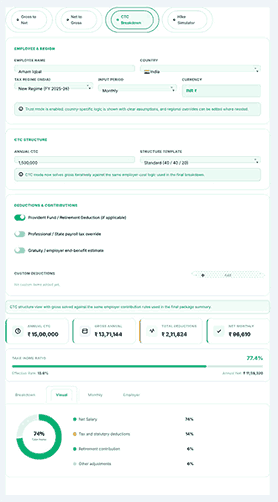
CTC breakdown visual showing cost to company structure, employer contribution, deductions, and net salary estimate

Compare structure templates instead of relying on guesswork.

Not all businesses pay their workers the same amount. Compensation packages vary: some focus on basic items, others on allowances, while some are structured conservatively to balance monthly payouts and benefits. Recognizing these differences is essential for accurate comparison.
 
This financial calculator includes salary templates that allow users to directly compare how various pay structures affect deductions, gross salary, and annual net income. Users can see how changing parts of a compensation package affects the final amount they receive.
 

In addition to structure comparisons, it’s important to understand employer contributions without mixing them into take-home pay.

When someone reads an offer letter, the employer’s contribution can make things less clear. Often, a big annual total might include benefits or company-paid portions that increase the company’s costs without increasing the employee’s direct monthly amount.
 
To make things easier, the calculator helps you separate those layers. This clarity not only enables a deeper understanding of the annual package but also allows for straightforward comparison to another offer that may have a different structure. Sometimes, this level of detail can make the difference between certainty and confusion when hiring or providing feedback.

Salary hike simulation for before and after comparison

The effect of a raise can often be ambiguous. It can affect gross income, tax liability, contribution amounts, and net pay simultaneously. Many people just look at the percentage of the raise and don’t really think about how much of a difference it will make in their take-home pay without an effective way to compare.

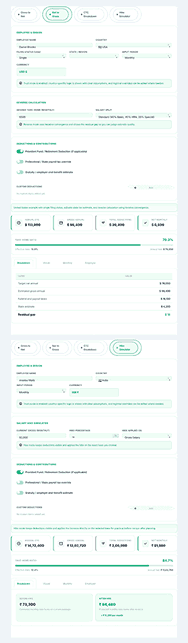
You can see these effects in the salary hike simulator. It allows users to compare their current salary structure side-by-side with the proposed salary structure, including gross pay, deductions, employer costs, and projected changes in take-home pay.

See the full picture before you accept a raise.

Many employees receive percentage raises each year and expect a larger benefit than they receive. In reality, increased pay can trigger higher deductions, so your net income may not rise as much as anticipated.
 
The simulator provides a clear side-by-side comparison of your compensation before and after a raise. This helps employees understand how appraisals affect them and enables managers to conduct transparent, informed pay discussions.
 

A smarter way to talk about raises than guessing
It’s easy to misjudge what a raise means. Simply adding the percentage to your salary often ignores changes in taxes and contributions, leading to unrealistic expectations.
 
This application excels by simplifying pay discussions. Displaying your current and new earnings in detail reveals where changes truly matter. This results in fewer misunderstandings and clearer expectations.
Reverse salary and hike simulator showing net to gross estimate, salary increase comparison, and updated pay summary

A more readable experience for people who do not love payroll language

Most people avoid salary calculators because the words related to payroll are complex. This tool makes it easy with easy-to-understand labels, editable inputs, and an easy-to-read breakdown.

It allows the users to switch between sections and see their results and understand the output without any prior payroll experience. It’s meant to make salary planning easier, not harder.

Suitable for both first-time job seekers and experienced professionals

A new employee opens an offer letter and calculates their monthly pay. A senior professional compares annual packages at two companies, each with different pay structures. Both seek clarity and may require different explanations.
 
This tool helps both new and experienced users. It clarifies technical salary terms so all users can understand their pay. It addresses common real-world money issues, easing concerns for users. For first-time users, it builds confidence. For experienced users, it offers structure to support their decisions.

Easier reporting and cleaner sharing

Sharing, reviewing, or saving a salary calculation streamlines communication of pay structures, making it easier for HR teams, consultants, finance advisors, and managers to share clear and consistent information without starting from scratch.
 
The Salary Calculator makes salary discussions easier by generating reports you can review, compare, and share. Export clear summaries to keep conversations going beyond one screen.
 

Useful when decisions need a second look

A single salary estimate often leads to more questions. Someone might want to review the result later, compare it to another offer, or show it to others. A calculator you can revisit and explain is more useful than a one-time formula box.
 
A well-structured result view helps. It turns a quick salary estimate into a clear record of how and why the number was made.

Why Use an Advanced Salary Calculator?

  • Conserves precious time
  • Ensures accuracy
  • Makes it easier to plan your finances
  • Supports you during income negotiations
  • Facilitates scrutiny of job offers
  • Consultants and independent contractors thrive with it.

Practical applications of this calculator

The tool enables a candidate to obtain a comprehensive understanding of their total compensation prior to accepting a job offer. Employees might check it before a performance review to understand how their pay is structured and whether it matches expectations.
 
HR teams can use it to model salary decisions confidently. Consultants can explain pay packages for clients more clearly, and founders can set transparent salary ranges for new hires.
 
The goal remains consistent in each scenario: individuals seek to understand their salary, its structure, and how it compares to others. Rather than unclear explanations, they value transparency about what their compensation package means in practice.
 

How the tool helps when comparing job offers

Comparing job offers can be tricky. One employer might offer a higher annual CTC, while another gives a simpler monthly payment. Another might include benefits that are valuable over time but easy to miss at first.
 
The calculator helps users see more than the headline salary. Breaking down each part, it highlights hidden differences in offers, making it easier to compare them accurately and choose what’s best.
 

How the tool supports annual reviews and planning

During appraisal season each year, employees often have similar questions about their compensation. What has changed? What does the new percentage mean for their monthly take-home pay? How much of the raise remains after deductions? How should they interpret the new pay package?
 
The salary breakdown and hike simulator facilitate these discussions. Users gain clarity by viewing the estimated impact, reducing the need for guesswork or assumptions.

Frequently Asked Questions

What does take-home pay mean?

Your net pay is your gross pay minus taxes and other deductions and employee contributions.

Can I take deductions and exemptions with this calculator?

Yes, this calculator can be used to calculate various components of salary, like a basic salary, HRA, transport allowance, medical allowance, bonus, provident fund, professional tax, or any other custom deductions that you might have.

How often do tax laws change?

Tax rules vary by region, filing status, employer policies, and types of deductions, and they change each tax year. Always check key findings against official sources.

Is this salary calculator 100% accurate?

No. The calculator works with the data and assumptions you provide, so results are estimates—not guaranteed figures. For exact numbers, always verify with your HR department, payroll provider, or official payslip.

Is allowance part of basic salary?

No. Basic pay is the fixed basis of your income, without additional allowances, bonuses, or any other benefit. Employers also give benefits such as HRA, transportation, and medical care apart from basic income. The remuneration system varies from country to country and from employer to employer.

Discover NexezTool's intelligent tools

Optimize your productivity with our most popular tools:

Simple Grade Calculator

See grades, metrics, and how well you’re doing in school right away.

Merit Counter

Give admissions and exams accurate merit scores.

Trading Position Size Calculator

A tool for managing risk in stocks, forex, and crypto.

Looking for more finance and productivity tools? Refer to the NexezTool Suite for more calculators, Excel helpers, and planning tools.

Why this tool feels more trustworthy than a rough estimate

Confidence matters when setting a salary. People rely on this data to choose where to live, budget, support families, or explore new careers. That’s why the calculator must be intuitive.
 
Trust builds when output is transparent, well-organized, and easy to interpret. Users see specifics: deductions, net pay, and employer costs—never left guessing. A tool that provides both results and clear explanations is preferable to one that reveals only a final figure.
 

A logical layout boosts user confidence.

Visitors are more likely to trust the computation if they can see every detail of the salary breakdown. They can easily review hypotheses, adjust numbers, compare scenarios, and carry out experiments.
 
This transparency makes the tool valuable, not confusing.
It also allows for smarter decisions. If you look beyond one number you get a much better idea of what a pay deal really means.

Smart salary planning for everyday decisions

Money decisions are rarely abstract. They are linked to rent, family plans, savings goals, commuting costs, moving options, and long-term career growth. When a salary calculator ties pay numbers to real-life situations, it becomes truly useful.
 
That’s precisely what the salary calculator does. It makes income analysis easier and more organized. It helps users better understand gross pay, deductions, annual package structure, target take-home planning, and the effects of a salary increase. All this happens without adding unnecessary complexity.
 

The real value is clarity, not just calculation.

You can find a basic calculator online. Most people really need a tool that makes sense of the numbers in a way that is helpful, honest, and easy to go back to. That’s what makes this tool stand out.
 
It helps people read salary structures, compare results, get ready for conversations, and make better pay decisions. There is less confusion. That kind of clarity is not a flaw for workers, employers, consultants, or job seekers—it’s the intended outcome.

Salary regulations differ internationally

Different countries have different ways of figuring out salaries. Here is a picture:
 

Pakistan

  • In Pakistan, the income tax system is progressive. People who make more money pay more in taxes.
  • Provident Fund (where applicable)
  • Payments to Social Security

India

  • Indian income tax plans that change based on your age and how much money you make
  • Taxation for professionals (in some states)
  • The PF bylaw

USA

This salary calculator includes accurate tax settings for the US, UK, Canada, UAE, Pakistan, India, Germany, and France. It also includes a manual tax mode that you can fully customize.

It is also available as an Advanced Income Tax Calculator for AY 2025-26 in South Asian countries such as Pakistan and India. HMRC (UK) and the Canada Revenue Agency (CRA) are two data sources.

How To Use the Advanced Salary Calculator

Step 1

Enter Your Basic Salary

Enter the exact basic salary that you earn or expect to earn.

For example:

  • Basic annual earnings: PKR 50,000.

  • OR US $2,000

  • OR, INR 30,000

Provide allowances.

If your package has things like

  • HRA

  • Travel Allowance

  • Medical Allowance

Put in these amounts. Most calculators provide optional fields for these.

Select Deductions

Select the correct deductions:

  • Income tax

  • Provident Fund

  • Pension contributions

  • Insurance

Every deduction lowers the amount of money you take home.

Click 'Calculate.'

Once every necessary field has been completed:
Press the Calculate button.
And right away, the tool shows:
✔ Total pay
✔ All deductions
✔ Paycheck

Scroll to Top