
LinkedIn Profile Optimizer for Job Seekers
LinkedIn Profile Optimizer for Job Seekers
Your LinkedIn profile should say who you are, what you do, and why the right person should contact you. A clear profile helps recruiters, hiring managers, founders, clients, and collaborators understand your values more quickly.
This LinkedIn profile optimizer for job seekers will help you write a stronger profile message with rough career details. It provides you with headline ideas, copy for the About section, experience bullet points, skills, keywords, hashtags, a recruiter pitch, and a practical profile checklist.
Use it if your profile is too generic, empty, wordy, or difficult to position. The aim is simple: build a profile that sounds professional, looks focused, and supports your next opportunity.
Why a LinkedIn headline generator matters
LinkedIn profiles represent public professional landing pages. Your headline is one of the first things people see in search results, connection suggestions, comments, messages, posts, and job applications before they even click on your full profile.
First impressions count. Your headline that says “searching for opportunities” or “experienced professional” is not giving enough context. A good headline tells people what you do, what you’re good at, what industry you’re in, and what value you provide.
The About section and your experience are similar. Clear wording lets people know your strengths. Strong keywords will help your profile appear in the right searches. Proof points will help your profile to sound credible, not generic.
What this LinkedIn optimizer helps you improve
It highlights the important parts of the profile. It helps you write a better headline, build a clearer About section, turn experience into better bullet points, and pick skills that fit your role.
In addition, it comprises convenient supplementary features that facilitate outreach and profile visibility. You can write search keywords, hashtags, a short pitch to recruiters, a message to your connections, wording for calls-to-action, ideas for featured sections, and checklist items to use immediately.
That pairing makes the tool helpful for those who want more interviews, more client inquiries, more networking conversations, or a stronger personal brand.
How Tool Works
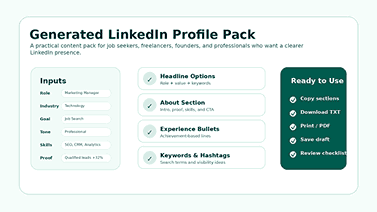
The process begins with a handful of simple inputs. Country/region, industry, job role, experience level, tone, profile goal, and output style can be selected. You may also add your target audience, top skills, achievements, current headline, and current About section.
The LinkedIn Profile Audit Tool then takes that info and builds profile content along the lines you specify. A job seeker can select the aim of his or her job search. A freelancer can set a client-oriented goal. A leader can choose to sound executive or leadership-like. This approach makes the result closer to the user’s real situation.
The audit fields are optional and make the output even more valuable. By pasting in your current headline and About section, the tool is able to more accurately score your profile and offer practical suggestions for improvement.
A stronger headline can change the whole profile
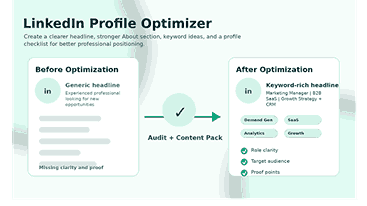
The headline is one of the most visible areas of your LinkedIn profile. It should include more than just your title. It should reflect your position, strengths, niche, and value in a single tight line.
A bad headline might read, “Marketing Professional.” A more powerful version might be “B2B SaaS Marketing Specialist | Demand Gen, SEO & CRM Growth.” The second version provides recruiters and clients more context to their search and a clearer reason to continue reading.
There are a few headline options the tool provides, so you can pick the one that best fits your personality, industry, and goals. This is particularly important because one profile might require a hiring-focused headline while another requires a client- or leadership-focused headline.
How the About section should support trust
The About section should NOT be a copy-paste of your resume. Describe your work, your audience, your strengths, and the kind of value you generate. It should be professional without being stuffy.
The most effective ‘About’ sections start with a punchy positioning line. Then they add relevant skills, proof points, achievements, and a short call to action. This structure makes the profile more readable and memorable.
This LinkedIn Profile Optimizer for Job Seekers helps users write an About section where they list their key strengths and selected accomplishments. Furthermore, it keeps the user’s tone of voice, whether the profile is for job searching, freelancing, networking, leadership, personal branding, or a career change.
Experience bullets should show outcomes
Plenty of LinkedIn profiles are full of job duties and lack impact. A duty is what you were responsible for. An achievement shows the change that happened because of your work.
For instance, “managed social media” is not as strong as “increased qualified inbound leads through an improved LinkedIn content strategy and reporting.” The second line delivers action, context, and business value.
The tool helps you translate achievements and proof points into more solid bullet ideas. The wording can be modified to match real results, company rules, and a personal style.
Skills and keywords help the right people find you
Keywords matter because people search for job titles, tools, skills, industries, and results. A qualified person with the right skills could miss out on a job opportunity and a chance to progress because they don’t have the right words in their profile.
But that does not mean keyword stuffing. A successful profile sounds like language. It places the most important terms in the headline, the About section, the experience list, the skills list, and the featured items where appropriate.
The tool recommends roles and industry keywords to help users understand what to put in their profiles. It also helps them choose skills that are relevant to the audience they’re targeting, not just throwing in buzzwords at random.
A profile score and checklist make improvements easier
The profile score offers a quick snapshot of how complete and focused a user’s inputs are. It does not replace human judgment but helps users understand whether they have enough role clarity, skills, proof, and audience focus in their profile.
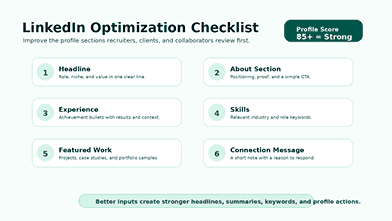
The checklist puts the outcome into practice. Instead of wondering what to fix first, users can check out their profile photo, banner, headline, About section, experience bullets, skills, featured work, custom URL, and contact details.
This approach makes the optimizer more helpful than a simple text generator. This document includes content and a roadmap to improve the complete profile experience for users.
Country and industry inputs make the output more relevant
The description of a software engineer in Canada should not read like the profile of a sales consultant in the UAE or a designer for remote clients. Language within the market, as well as expectations regarding roles and the search terms used, can differ significantly across industries and regional contexts, influencing how profiles are written and interpreted.
The country and industry fields help the tool to contextualize the output. Regions include the United States, the United Kingdom, the UAE, India, Pakistan, Canada, Australia, Singapore, Germany, or the remote/global market.
Picking an industry is beneficial for focus. Profiles within technology, marketing, finance, healthcare, education, sales, HR, consulting, engineering, design, and operations all need different language and keyword focus.
Tone and profile goal help the content sound natural
A successful LinkedIn profile has to be a reflection of the real person behind it. A technical professional may need skill-based wording. You may have to take the founder’s word for it. Perhaps the designer wants something more creative. Senior leaders may require executive presence.
The free LinkedIn Profile Optimizer supports the following tones: professional, executive, creative, friendly, and technical. It also helps with things like job searching, getting freelance clients, leadership positioning, networking, personal branding, and career change.
These options make the result more human. The optimizer doesn’t just apply the same template to every user. It customizes the direction to the person’s aim and tone.
Recruiter pitch and connection message save time
Optimization of profiles is not only about the profile itself. Furthermore, job seekers and professionals need short messages for recruiters, hiring managers, clients, and new connections.
The ideal recruiter pitch should be succinct, precise, and straightforward. It should include the role, key strengths, and the type of opportunity the person is looking for. Your connection message should be polite and relevant, and it should not sound like an automated message.
The LinkedIn Profile Optimizer for Job Seekers produces both, allowing users to transition from profile enhancement to active outreach. This is a giant bonus for people who want results, not just better wording, as it enables them to successfully interact with potential connections and reach their networking objectives.
Featured section ideas add proof to the profile
The profile getting in the Featured section adds credibility to it. It can demonstrate a portfolio, case study, resume, project, presentation, certification, article, media appearance, or proof-of-work asset.
Many users ignore this section because they do not know what to put. The LinkedIn Profile Checker suggests ideas based on the user’s role, industry, and goal. That makes the profile evidence, not just claims.
A featured resume or sample project can support job seekers’ applications. A case study can help build client confidence in the offer by providing real-world examples of successful projects and demonstrating the freelancer’s expertise and problem-solving skills.
Who should use this LinkedIn Profile Optimizer?
The tool helps job seekers to build a more focused profile before applying for jobs or contacting recruiters and turn skills and accomplishments into more compelling messages.
It can help career switchers frame their experience around a new target role. The profile and tone they choose to use allows them to demonstrate transferable skills without seeming unfocused.
Consultants, freelancers, and founders use it to optimize their clients’ positions. Clear headlines, compelling About sections and proof-driven featured assets make all the difference.
Students and fresh graduates can leverage it to create a professional first impression. Maybe they don’t have years of experience, but they have projects, internships, certifications, skills, and career guidance to show for it.
How to use the optimizer step by step
Select your country or region and industry. This helps the LinkedIn Profile Optimizer for Job Seekers understand the professional market and the type of language needed to shape the profile.
Then select your job role and experience level. Be specific. “Professional” is vaguer than “data analyst.” “UX designer (junior)” is better than “designer.” Stronger inputs yield stronger outputs.
Choose your tone and profile goal next. A job-search profile should be different from a freelance lead generation profile. The tone determines the writing style; the goal, the direction.
Then, add top skills and accomplishments. This section is where the profile gets captivating. Measurable results, tools, certifications, client results, and project wins increase the credibility of the generated content.
Finally, use the output with caution. Choose the best headline, write the About section in your voice, spruce up the experience bullets, and implement the suggestions from the LinkedIn checklist.
Best practices for a recruiter-friendly LinkedIn profile
Try a mixed-roles/keywords/value headline. Make it searchable enough and readable enough so that a real person can understand it at a glance.
If your industry allows, please write the ‘About’ section in the first person. Use short paragraphs. Share your focus, strengths, proof points, and the opportunities or conversations you seek.
Apply accomplishments in the Experience section. Add numbers when they are correct. Reduced onboarding time by 30% by redesigning the client intake process across three product lines.
Customize the skills section for your target role. Don’t list every skill you’ve ever had. Focus on the skills that will help you obtain the next opportunity you want.
Common LinkedIn profile mistakes to avoid
The first common mistake is writing a headline that is too broad. Recruiters and clients are unable to comprehend your focus when you use a comprehensive headline. Incorporate a role, niche, talent, or outcome.
The subsequent error is the creation of an About section that solely reiterates the job history. The About section should not merely identify each role on your resume; rather, it should discuss your position and the value you provide.
The third error is the assertion of meaningless claims without any supporting evidence. Words such as “motivated,” “results-driven,” and “hard-working” become more persuasive when you support them with tangible examples.
Neglecting the Featured section constitutes the fourth error. A profile that includes proof-of-work assets is frequently perceived as more credible than one that exclusively employs text.
How this tool supports different profile goals
This tool can generate content that highlights role fits, measurable strengths, and recruiter-friendly keywords for job searches. This helps users get an interview position.
The tool has the potential to change the language of freelancing to focus on client outcomes, service clarity, and trust. This feature helps users to describe whom they help and what results they get.
The tool can facilitate a more strategic tone in leadership positioning. It can be used to demonstrate authority, business impact, team outcomes, and decision-making.
The tool is capable of maintaining the friendly tone of the message during networking. It enables users to appear responsive to conversations without turning their profile into an aggressive sales pitch.
Frequently asked questions about LinkedIn profile optimization
What is a LinkedIn profile optimizer?
A LinkedIn profile optimizer is a tool that helps you improve your headline, About section, experience bullets, skills, and keywords for better visibility and impact.
Who Needs a LinkedIn Profile Optimizer for Job Seekers?
This tool is for job seekers, career changers, fresh graduates, professionals, freelancers, consultants, founders, and students to create a clearer profile and a more powerful career message.
Is this tool writing my LinkedIn headline for me?
Yes. Based on your role, industry, skills, market, tone, and goal, the tool will generate headline options for you. Pick the best version and then edit it before posting it on LinkedIn.
Can it help me rewrite my About section?
Yes. The tool creates a structured About section with your role, strengths, target audience, featured achievements, and a natural call to action.
Does it help with LinkedIn keywords?
Yes. The tool recommends search keywords and skills that are relevant to your role and industry. They are natural to use throughout your headline, About section, experience, and skills list.
May I use it for freelance or client work?
Yes. Select the freelance or client-oriented goal. Add your target audience, services, skills, and achievements. The output can help you explain your value to potential customers.
Can I save or export the content that is generated?
Yes. The tool supports practical actions such as copy, TXT download, print, or PDF, as well as local saving. These options give users the ability to save their profile pack to edit later.
Is the output ready for publication?
The output is useful as a starting point. Review the output, confirm its accuracy, remove any irrelevant information, and edit the phrasing to accurately reflect your experience.
Benefits of an Optimized LinkedIn Profile
Good LinkedIn profile will help you
Move up in LinkedIn search results.
Stand out to recruiters.
Improve job response rates.
Gain professional credibility.
Attract More & Better Networking Opportunities.
Privacy & Security Guaranteed
There is no data saved.
Avoid tracking
No cookies!
in compliance with GDPR
Final thoughts
Building a strong LinkedIn profile requires effort. You need clear positioning, searchable keywords, proof-based writing, and a message that fits the opportunities you want.
This LinkedIn profile optimizer helps job seekers build that foundation more quickly. It takes career details and turns them into useful profile content, practical outreach text, and a checklist for steady improvement.
Utilize the tool to help improve your profile, then customize the outcomes. The best LinkedIn profiles read clearly, credibly, and humanely.