
Online Spreadsheet Editor for Fast, Easy Data Management
What Is an Online Spreadsheet
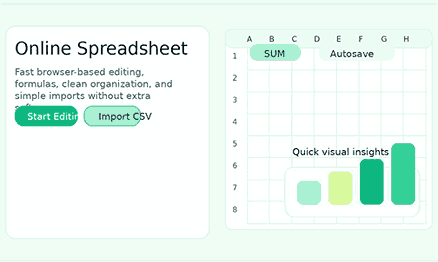
You can use an online spreadsheet to organize, change, calculate, and review data without having to install any software on your computer. You can open it on your phone, tablet, or laptop, make quick changes, and keep working from just about anywhere. That ease of use is no longer a plus for modern users. This is the least you need to have a useful spreadsheet experience.
Why the Subject Still Matters
The Change to Work in a Browser
Why People Choose an Online Spreadsheet
No installation slows you down.
You can work from almost any device.
Flexible access is important for modern work.
Core Benefits of an Online Worksheet
It feels better to enter data simply.
Quick Formulas Cut Down on Manual Work
Importing and exporting keep the tool useful.
Find and Replace is a fast way to tidy up data.
Why Simplicity Wins
- Excel Lite Sheet has a focused interface that makes it easier on your brain.
- Surface common actions to reduce clicks.
- To keep the momentum going, keep the performance quick.
- Skip accounts you don’t need to protect your privacy.
Features Users Expect from a Great Online Spreadsheet
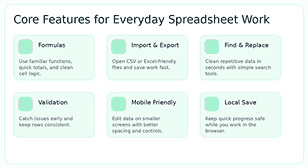
Those who type “online spreadsheet” into a search engine usually want to do more than just look at it. Most people want to be able to edit, calculate, organize, and save information without worrying about it. That means the page should not make vague claims but instead use simple language to explain how the features work. Clearly describing features boosts SEO and improves conversions.
Formula Help That Feels Like Home
Sorting and a well-organized structure
Stopping and checking mistakes
Autosave and Progress in the Area
Controls that work on phones and tablets
Best Use Cases for an Online Spreadsheet
Keeping an eye on your budget and planning how to spend your money
Using an online spreadsheet to manage your monthly budget, side business expenses, cash flow, and event planning. Users can add formulas, create categories, compare totals, and update values as new data arrives. Because the tool is web-based, they can use it whenever they want to check their spending or remaining balance.
Making lists of things to do and planning projects
Because the rows and columns make planning simple, many teams use spreadsheet-style layouts to manage their tasks. You can see all in one place who owns what, when it is due, what the priorities are, and how far along you are. When you want to keep things clear instead of adding a lot of project management work, a fast online spreadsheet is very helpful. It gives users a structure without making them stick to a strict workflow.
Work with Operations and Inventory
Typically, small businesses require an easy way to track inventory, reorder levels, supplier information, and to-do lists. If you want to quickly edit, search, use formulas, and keep things organized, an online spreadsheet is a great tool. Teams will benefit even more if they can import data from previous projects rather than starting from scratch.
Schoolwork and Students
Students, teachers, and tutors use spreadsheets to keep track of grades, make study plans, and make lists of things to research. A spreadsheet tool that runs in a web browser is a good choice for this situation because it’s easy to open on shared devices and lets you make quick changes between classes. When the interface is clean, users can focus on the content instead of having to learn how to use the tool.
Work on content, sales, and marketing
Spreadsheets help marketing teams keep track of campaign trackers, content briefs, lead lists, keywords, and editorial calendars. Sales teams use them to plan outreach and quickly see what’s in their pipeline. An online spreadsheet makes it easy to work together, do some light analysis, and change how things are set up in both cases. This is helpful for departments that need to move quickly and change their priorities a lot.
How an Online Spreadsheet Saves Time
The best thing about this type of tool is how quickly it operates. Most of the time, someone who visits the page doesn’t want to hear a long lecture about how software works; they just want a useful answer. So, the content should use simple language to explain how much time it saves and connect features to results.
Less setup time means faster work.
When a page opens a spreadsheet that can be used in the browser, users can start right away. That cuts down on the little delays that slow people down all week and saves time at the beginning of each task. People often keep using a tool because it makes their lives easier.
Cleaner workflows make it less likely that you’ll have to do the same thing over and over.
Time is wasted by individuals when they copy data from one tool to another, rename entries by hand, or fix the same formatting problem over and over. A good online spreadsheet cuts down on that by putting all the common tasks in one place. Formula support, import tools, search actions, and organized editing all make it easier for users to get to the end result with fewer steps.
People can make better choices when they can see better.
A worksheet is more than just a place to store information. It is also a way to understand what the data means. When rows are easy to read, formulas are correct, and quick summaries are shown, people can work faster. That is helpful for any workflow that needs clear and correct information, like operations, finance, and planning content.
Online Spreadsheet Versus Traditional Desktop Spreadsheet
You Have More Options with Desktop Tools
Browser tools speed things up and make them easier to find.
The task tells you what the right choice is.
How to Choose the Right Online Spreadsheet
Not every spreadsheet program is right for every user. Some people need to work together first. Some people care more about clean imports, lightweight performance, or local processing that doesn’t share their data. This part helps the content meet more general search intent and helps visitors make a choice.
Look for a Clean Interface
The first time you use a good online spreadsheet, you should be able to figure out where to put data, where formulas go, and how to do basic tasks. The interface has too many things on it, which makes mistakes more likely and makes the tool feel heavier than it needs to. Simplicity does not mean a lack of power; it means that the company is putting more thought into its products.
Check that the files are compatible
Consider Using Your Phone Early
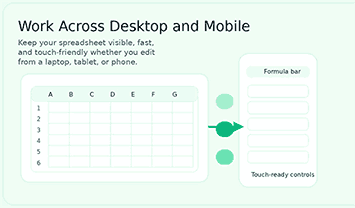
A page may look fine on a computer but not work well on a phone. If mobile visitors are important, the content should focus on easy-to-use controls, easy-to-read spacing, and editing that is easy to do with your fingers. Making your product mobile-friendly is good for both the product and SEO because it makes the experience better for real users once they click.
Think about how private and reliable it is
Why This Online Spreadsheet Tool Stands Out
A good product page should do more than just list benefits at the category level. A good product page should do more than just list benefits at the category level. It should also explain why you should use this tool. It should also explain why you should use this tool. The best way to do that is to connect real features to clear user outcomes. The best way to do that is to connect real features to clear user outcomes. The text below does just that.
Editing experience that is fast and to the point
Built-in formula support for basic math
The tool has helpful formula workflows that let users add up numbers, compare cells, and get results all on the same page. That means it’s more than just a table editor. It becomes a useful spreadsheet in your browser for budgets, planning sheets, status trackers, and a lot of other real tasks that need numbers to work.
Tools for quick cleanup, importing, and exporting
Visitors often want to open data that is already there, improve it, and save it in a way that they are used to. This tool helps with that practical flow by letting you import and export files and clean up your work with features like “find and replace.” These things make the page easier to use and less annoying for people who need to get things done fast.
Save your work automatically, check your data, and trust it more.
A spreadsheet truly shines when it actively supports safe work practices. Features like autosave, validation checks, and data quality indicators all contribute to a heightened sense of confidence in the accuracy of your edits. This is particularly valuable for individuals managing critical business records or frequently updated lists, where precision is paramount.
Design that works well on tablets and phones.
How to Get Started with an Online Spreadsheet
Additionally, a lot of users want to know that the tool is immediately simple to use. A short “Getting Started” section builds trust by showing how to use the product in a few easy steps. This type of content can also lower the risk of bouncing by making it clear that the learning curve is not too steep.
You can either start with a blank page or bring in data that is already there.
Typically, people have two desires. They either want to open an old sheet or make a new one. Both of these things can be done with a good online spreadsheet. Because it is flexible, the product is helpful for both new and experienced users. New users can start from scratch, and users who have been around for a while can change data that is already there.
Use formulas to change values and sort rows.
Once the sheet is open, users should be able to enter values, add formulas, and sort the data without any problems. The more comfortable those actions are, the faster people will trust the product. That’s why it’s important for an editing page to have easy-to-use controls and a layout that makes sense.
Save or export the work when you’re done.
After editing, users want an easy way to save the result. The experience is better because there are export options, the ability to save locally, and clear feedback on progress. They also make the message about the product stronger by showing that the tool can do real work from start to finish.
Who Can Benefit Most from an Online Spreadsheet
This page should make it clear that the product isn’t just for one kind of person. Spreadsheets are flexible, so the best content will appeal to a wide range of people, but it will still be believable. That adds more keywords while still keeping the writing based on real life.
Freelancers and people who work for themselves
Freelancers often need a simple tool to help them write proposals, keep track of their tasks, and plan their work. An online spreadsheet meets those needs because it is quick and easy to change. It helps people who work alone plan their work without having to deal with complicated systems that take longer to run than the work itself.
Small Groups and New Companies
Lean teams need to be quick, clear, and adaptable. They need tools that let them test workflows, keep track of information, and share updates quickly and easily. A spreadsheet that works in a web browser makes it easier to do things because it lowers the barrier to action.
Students, researchers, and educators
Students frequently require a quick way to create lists, compare numbers, and construct simple trackers. A clean online spreadsheet is a good choice for that because it’s easy to get to, you know how to use it, and you can access it from different devices. It helps with real work without making things too hard.
Security and Trust Matter on a Spreadsheet Page
You have to trust even basic data tools. Visitors want to know that their work won’t be lost and that the editing process will stay the same. Content that talks about trust directly can help sales because people are more likely to buy something if they feel like they can trust it.
Editing that stays the same builds trust.
The story about the product includes how dependable it is. Users feel safer spending time on the tool when they can move through the sheet, make changes, and keep track of their progress without any surprises. That confidence is a quiet way to grow because good experiences lead to more visits and better word of mouth.
Having clear saving habits can help you feel less stressed.
They want to know what happens to the work they do. The page should make it clear what happens when the tool saves to your computer, saves progress automatically, or gives you clear export paths. Being honest makes things easier and lets new users know what to expect before they start editing.
Final Thoughts on Choosing an Online Spreadsheet
The best online spreadsheet is the one that makes it easier for people to get things done. It should open quickly, be easy to understand from the first click, support practical formulas, and make it easy to manage data on all of your devices. That’s what people really want when they look for this type of thing. If your page clearly and honestly shows those strengths, it can be a better ranking tool and a better conversion tool.
Try Excel Lite Sheet Today
Pick clarity over complexity: open the Excel Lite Sheet, finish your project quickly, and save time every week. This is my favorite program for quick and easy spreadsheets.
Frequently Asked Questions About Online Spreadsheet Tools
Can I use an online spreadsheet without having to download anything?
Yes. Users can open and edit a real online spreadsheet right away in their browser without having to install any desktop software. That makes it easier to reach and use on a variety of devices.
Can you use formulas in a spreadsheet on the web?
Everyday math problems like adding up values, comparing cells, and more can be solved with a good online spreadsheet. Formula support turns the tool from a simple grid into a real workspace, which makes it more useful.
Is it useful to have a spreadsheet on your phone?
Of course, as long as the interface works well on smaller screens. For mobile usability, it’s very important that controls are easy to touch, there is clear space between them, and editing actions are easy to see.
Can you bring in data in CSV or Excel format?
That feature is very popular, and it’s one of the main reasons to use a spreadsheet tool online. Import support makes it easy for users to work with files that are already there instead of having to rebuild data by hand.
Who should use an online spreadsheet?
An online spreadsheet is useful for freelancers, students, small teams, marketers, operations staff, teachers, and anyone else who needs to quickly change data in the browser. It is especially useful when speed, flexibility, and easy access are more important than how complicated a big business is.