
CGPA Calculator with Credit Hours
More Tools
CGPA Calculator with Credit Hours
A good CGPA calculator should be more than just a number; it is intended to help students input grades accurately, understand the impact of credit hours on the final result, and make better academic decisions before the start of a new semester.
Use this calculator as a planning tool along with your official university transcript. Each school has its own policies on rounding, retakes, pass/fail courses, withdrawals, and grade replacement. Compare the results with your academic policy. Always.
What this tool helps students do
The CGPA Calculator with Credit Hours helps users calculate their cumulative grade point average using grades and credit hours. Students can add multiple semesters, enter individual courses, select a grading scale and see an updated result in real time.
You can also use the tool in other academic tasks. It enables users to calculate total percentage, check total credits, check total grade points, compare semester progress and view academic standing without opening a spreadsheet.
It makes it useful for daily academic tracking, end-of-term review, scholarship planning, transfer applications and graduation preparation.

Key features that make this calculator more useful
A useful calculator has to save time from the first click. This one supports multiple semesters, common grading scales, live calculation, and clean result summaries. Students can provide a complete academic record instead of making rough estimates.
It also offers some planning features, like percentage conversion, target CGPA calculation, what-if simulation, saved profiles, CSV export, and backup import/export. These features make the tool useful for semester review, scholarship planning, advising, and graduation planning.
The clean, mobile-friendly layout is important too. Between classes, or during registration, or right after the grades go up, many students check their grades on their phones. A responsive calculator provides a quick and frustration-free experience.
How to use the CGPA calculator correctly
The best results come from the right inputs. Students should collect the course names, letter grades or grade points and credit hours before they begin. But a clean input process avoids small errors that can skew the final average.
Step 1: Select the grading system of your university/education system. Typical choices are 4.0, 5.0, 7.0 and 10.0. If your institution uses a supported country or university pattern, you should first select that system so that the calculator stays consistent with your official grading method.
Next, select the semester and add all the courses. Type the course name for reference, click the grade, and add the correct credit hours. Repeat this process for every course in that semester!
See what’s happening now. The CGPA Calculator with Credit Hours updates CGPA, equivalent percentage, total credits, total grade points and course count as you enter/edit data. That instant feedback helps users catch errors before they get spread across the summary of the result
How semester grouping improves accuracy
CGPA is cumulative by design. That is why semester grouping is important. One list of courses can become messy if a student has finished many terms. It also keeps the input cleaner and makes the record easier to check when ordering courses by semester.
It also helps with academic planning. If users can see their semester-by-semester performance, they can identify strong and weak terms, as well as the specific period that affected their overall average. That context is particularly useful for scholarship applications, academic review meetings, and recovery planning.
Why credit hours matter so much
Credit hours affect the final result more than many students expect. A 1-credit course and a 4-credit course with the same grade will not have the same impact on your CGPA. That’s why a small improvement in a hard course can raise the average more than several small improvements in easy courses.
People don’t just want a grade average. They want the weighted version, which is how universities actually calculate academic performance.
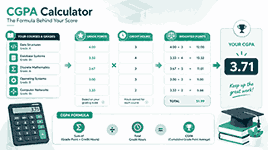
CGPA formula explained in simple words
CGPA is a weighted average. The course with more credit hours will have a bigger effect on the final result than the course with fewer credit hours.
CGPA = (Σ (Grade Point x Credit Hours))/(Σ Credit Hours)
Multiply the grade point for each course by the number of credit hours. Add up all the weighted points. Take that and divide it by the total number of credit hours.
A quick CGPA example
Suppose a student is taking four courses.
Course A is 4 credit hours with a grade point of 4.0. Course B is credited with 3 hours and a grade point of 3.3. Course C is 3 credit hours and has a grade point of 3.7. Course D has a grade point of 3.0 and is worth 2 credit hours.
The weighted points are 16.0, 9.9, 11.1 and 6.0. Total Points (Weighted): 43.0 Total credit hours are 12. If you divide 43.0 by 12, you obtain 3.58. And that’s the CGPA.
The calculator does the calculation right away, but it still helps students understand the logic. If users understand how the formula works, they have more trust in the result and enter the data more carefully.
Difference between GPA, SGPA, and CGPA
Students often mix up these terms, but they are used for different things. GPA usually means the grade-point average of one set of courses. SGPA is often short for semester grade point average. CGPA stands for cumulative grade point average of all semesters or the entire academic record.
This distinction is important because different institutions require different values. In a scholarship form, it may ask for the last semester GPA. The cumulative total may be requested by a university transfer or employer. A good calculator should help users understand the recent result and the long-term result.
Support for common grading scales
Academic systems differ by region and by institution. Some schools use a scale of 4.0. Others use 5.0, 7.0 or 10.0. A good CGPA calculator should take that into account, instead of imposing one system on all users.
This tool provides the most common scales students search for. That flexibility makes it useful to learners in North America, South Asia, the Middle East and many international programmes. It also reduces confusion when students compare transcripts across different systems.
Built-in converter for GPA and percentage values
For many students, a cumulative average isn’t enough. They also need to convert percentages to GPA, GPA to percentages, or one scale to another. That’s why the converter section really adds value.
Here you can convert between percentages (GPA 4.0, GPA 5.0, GPA 7.0, and CGPA 10.0) in one place. When you need a grading format for a form, scholarship application, or international transcript comparison, the converter can be helpful.
Target CGPA planner for goal-based students
A strong academic tool should not be restricted to today’s result. It should also help students to plan for tomorrow’s result. The target planner does this job by indicating the GPA needed in future credits to reach the desired CGPA.
This feature can be helpful during course registration, before finals, and after every semester. Students can enter the current CGPA, completed credits, target CGPA and remaining credits. Then the planner defines the required level of performance. This offers the user a real goal, not an abstract hope.
What-if simulation for realistic planning
The what-if feature allows students to see how their grades might change in different scenarios. A user can start with a base CGPA and completed credits and add a simulated semester and see how the future performance could affect the cumulative result.
This makes the calculator a bit more strategic. Students can compare multiple possible outcomes, try out recovery strategies, and choose where to direct effort. That is much more useful than just checking the current average once and leaving.

Saved profiles, backups, and export tools
The same calculator is used repeatedly by students. That’s why the profile save and backup features are important. They allow users to store data between sessions instead of starting from scratch each semester.
The tool allows you to copy the summary, print or save as PDF, export CSV, and import or export JSON backup. These features are great for record-keeping, advising meetings, reviewing transcripts and quick sharing. They also make the tool more trustworthy, as users control their data.
Why CGPA Calculator with Credit Hours works well on mobile
Much academic searching takes place on mobile. Students check their standing after each quiz, exam or semester result. If it is difficult to use the calculator on a phone, they leave.
A mobile-friendly layout enhances real usability. It’s easier to use on small screens, with touch-friendly buttons, readable fields, compact result cards and responsive semester sections. That practical advantage can also boost engagement signals as time goes on.
Who should use CGPA Calculator with Credit Hours
This CGPA calculator with credit hours is appropriate for a wide academic audience. It can be used by undergraduates to monitor progress after each term. It can be used by postgraduate students to track their performance in high-stakes programmes. It can also be used by diploma and community college students for credit-based planning.
It also assists international students grappling with different scales, parents seeking a clear view of performance, and advisors requiring a quick reference during academic support sessions. The broader the use cases, the longer-term the value of a page is.
How students can improve CGPA over time
Rather than guessing, you can make better choices to increase your CGPA. The first step is to identify high-credit courses, as they usually have the most significant impact. A good grade in a hard course improves your average faster than a similar improvement in an easy course.
The next step is to examine weak patterns. If a student keeps struggling in a certain area, like labs or quizzes, it may be their study method that needs to be changed, not how hard they are trying. Once the pattern is evident, the student can strategise more effectively.
Early target planning is another strategy that students should use. Waiting until the last few weeks of the semester limits their options. A target planner shows the required GPA, enabling students to adjust their goals, ask for help, and manage their course load with more confidence.
Practical tips to raise a low CGPA
Where institutional policy permits, a retake strategy is important. Students should look at weak results with high credit hours in the case of a university replacing a low grade with a high repeat grade.
Effective time management is also important. Regular, shorter study sessions are generally better than irregular cramming. Strong students also go through marking schemes, solve past papers, and seek help early rather than waiting until the semester ends.
And that’s where the calculator really helps, by translating those decisions into quantifiable results. Students can experiment with a new goal, simulate a better semester, and identify which action leads to the greatest academic payoff.
Common mistakes students make during CGPA calculation
A frequent error is the use of the wrong grading scale. A 4.0 and a 10.0 are not the same thing. Be sure you are in the right system before entering any data.
Ignoring credit hours is a mistake. A simple average of grade points might seem close to the real answer, but it can go wrong if courses have different weights. Credit hours are the right way to go.
The third mistake is to include courses that are not graded or excluded when the institution does not count them. Each institution has different policies for pass/fail, withdrawals, retakes or incomplete grades. Students are required to conform to the formal academic regulations of their programme.
Final thoughts
A high CGPA calculator will give you more than one figure. It’s designed to help students understand the formula, confidently input their grades, compare scale-based results, plan future goals, and track progress across semesters.
That’s what makes a calculator worth coming back to. When a tool is fast, its interface is clear and the content answers real questions, students get something more valuable than a single result. They obtain a better next step academically.
Advantages of Knowing Your CGPA
Knowing your CGPA is not just a fun fact; it is a powerful tool that can help you take control of your future.
Set motivating goals. Turn your long-term dreams (e.g., earn a 3.5 or better) into challenging course goals. Every win counts!
Select high-impact courses: Choose courses that will upgrade your CGPA and knowledge.
Plan your course load. Take easy semesters and hard semesters alternately to protect your grades and your confidence.
Apply for scholarships when your CGPA is highest so that you can present yourself well and grab great opportunities.
Interviews: Be sure of your CGPA – use your achievements to tell a story of your growth over time.
Don’t be surprised: prepare for graduation requirements calmly and confidently.
Celebrate every step of progress you make each term – each achievement takes you closer to your goals!
Frequently asked questions about using a CGPA calculator
What is a CGPA calculator?
A CGPA calculator helps calculate the cumulative grade point average based on grade points and credit hours of multiple courses or semesters. The CGPA calculator helps users get a clear academic summary based on weight averages.
Is CGPA equal to GPA?
Nope. GPA is usually an average over one term or one set of courses. CGPA is the cumulative average of the whole record or of several semesters.
Why do credit hours matter in CGPA?
Credit hours matter because they indicate course weight. The higher the number of credit hours, the more it affects the final CGPA than a course with lower credit hours.
Can I use this calculator for 4.0, 5.0, 7.0, and 10.0 scales?
Yes. It supports the most common grading scales used by many universities and international education systems.
Does this calculator calculate future CGPA?
Yeah. The target planner and what-if simulator let you estimate how your performance in future semesters will affect your cumulative result.
Can I export or download my results?
Sure. You can copy the summary, print it, save it as a PDF, export CSV data, or create a backup for later.
Why does my result differ from my student portal?
Differences are usually due to rounding rules, courses not included, retake rules, or the grading scale used. The calculator should be set according to the rules of the user’s institution.
Can only university students use this calculator?
Nope. It can also help college students, diploma students, postgraduate learners, international students, advisors, and parents who need a clear academic overview.