
Trading Position Size Calculator
What is a position size calculator?
A position size calculator for trading can help you work out how big a trade should be before you place an order. It calculates the right lot size, units, shares, contracts, margin, and possible trade outcome according to your account balance, risk limit, entry price, stop loss, and market settings.
“Good traders don’t base a position size on emotion. They figure out what they are willing to lose before they let the numbers decide their order size. This means that each trade has a defined risk plan attached to it, rather than being a shot in the dark.
This tool takes you through a disciplined process. Test buy or sell setups, compare risk vs reward, include fees, review margin, plan for multiple targets and save calculations for later review. Our days calculator can help you schedule weekly or monthly trade checks to determine timing.
Why Should You Use a Trading Position Size Calculator Before Trading?
Occasionally a position looks good on a chart, but the risk may be too great. A position size calculator will tell you what the actual cost of that setup is before you hit buy or sell. It will help you ensure that the trade fits your account, strategy, and risk rules.
Risk control is critical—one disastrous trade can wipe out weeks of effort. Calculate size properly, and a losing trade remains within the risk amount you chose. Well, that makes the next decision easier; your account is still protected.
Traders will also use position sizing to keep consistency between markets. With a tight stop, you may use a larger size; with a wide stop, you may use a smaller size. The calculator is adjusted to size around the stop distance so your risk remains the same even if setups change.
How a Trading Position Size Calculator Works
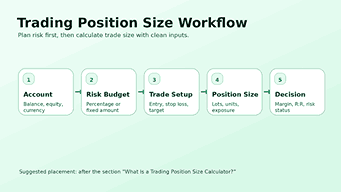
The Trading Position Size Calculator begins with your account details. Enter balance, equity, currency, and current open risk. These inputs help the tool understand how much capital you have available and what exposure you have in the market already.
Then you choose a risk mode. If you want your position size to grow and shrink with your account, then percentage risk is excellent. Fixed risk is the best choice if you have a certain amount of money in mind for a specific trade.
Thereafter, you go into the trade setup. The tool calculates a more realistic position size and trade outcome according to your market type, position side, entry price, stop loss, take profit, leverage, commission, spread, and slippage.
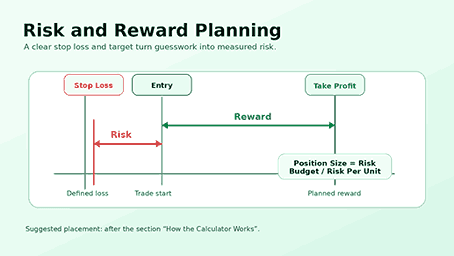
The concept behind it is still simple. Estimated size = risk budget / risk per unit. Additional settings further refine that answer to better fit the symbol, broker contract, fee model, and risk limits.
Essential Critical Inputs
An account balance reflects the capital base for risk planning. Equity is the value of the live account; the floating profit or loss changes the actual amount available. The existing open risk allows you to avoid piling up too many risky trades at the same time.
The risk percent represents the portion of your account that you are prepared to forfeit if the stop loss is triggered. Many traders like small percentages because they want to make sure they have room to survive a losing streak. A certain measure of risk gives the same amount of control in a direct currency value.
Set the price at which you want to open the trade. If the idea fails, exit the trade at the stop loss. Take profit estimates of expected profits. These three numbers are the risk-reward structure of the setup.
Leverage does not change the quality of a trade, but it does change the margin. A higher leverage setting can reduce the margin required but can also make incorrect sizing look easier than it should. The calculator helps you see the impact of the margin but keeps the risk in focus.
Best Practices for Using a Position Size Calculator
- Apply realistic stops (structured / ATR-based).
- Keep the risk percentage the same.
- Don’t over-optimize.
- Double‑check calculator inputs before emotional decisions.
Market Types Supported by the Tool
This position size calculator is for forex, crypto, stocks, indices, metals, and commodities. That range means traders have one clean workflow for all the instruments rather than switching calculators for each market.
Editable contract and tick settings allow forex traders to customize lot sizes. Stock traders value shares on the basis of entry, stop loss, and risk. Crypto traders are able to scale trades based on the volatility of price movement, fees, and exposure on the account.
Forex, metals, crypto, and commodities can move fast, so every trade needs a defined stop and a realistic size. Traders who use this calculator for currency pairs should also review forex trading risks before increasing exposure in volatile markets.
Trade Planning Buy & Sell
For a long trade, you need a stop loss below the entry and a target above the entry. A stop loss should be placed above the entry, while a target must be set below it for a short trade. The calculator checks the direction, and the result for risk reward is the same as the real trade idea.
This is important because if the target direction is wrong, the setup can look profitable when it is not. Good validation means you can get input mistakes before they turn into actual trading mistakes.
Buy and sell trades have the same risk logic. It measures the distance between entry and stop, calculates risk per unit, and then estimates the size that keeps it around your selected risk budget. If you want to plan entry, stop loss, take profit, and risk-reward together, use our complete trade planner calculator for a full trade setup view.
Position Sizing Formula and Risk Budgeting
Position sizing starts at a risk budget. If you have $10,000 in your account and you are taking a 1% risk, your risk budget is $100. Before making any adjustments for fees, spread, or slippage, that number represents the worst possible loss the trade could incur.
The risk per unit is the distance from the entry point to the stop loss. The further away, the more risk per contract, so the calculator scales down the position size. The smaller the distance, the lower the risk per unit, so the size estimate can go up.
The trading position size calculator formula is useful because it associates every trade with the same risk rule. No more guessing how much is enough. The numbers tell you what size fits the arrangement.
Example of a simple trade calculation
Let’s say a trader has a 10,000 account and wants to risk 1% on a stock trade. The risk budget is 100%. The trader is going to buy in at 50 and place the stop loss at 48. That means there are two risks per share.
50 total shares. 2. 100/100. The planned loss should be close to 100 (before any further costs) if it hits the stop loss. If the target is 56, the gross possible reward is 300, as each share has 6 points of upside.
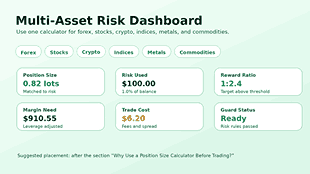
This position size calculator for trading will do the math for you in a second and save you time. It also contains associated figures like position value, required margin, reward ratios, break-even price, trade cost, net profit, and net loss.
The Risk-Reward Ratio Explained
Possible loss vs. possible gain. If you risk 100 and make 200, that is 1:2 ratio. That is, the expected reward is double the expected risk.
Ratio does not equal profit. It just helps you decide if the potential reward is worth the risk. It may not be worth having a position on a board with a weak target, even if the entry looks intriguing.
This position size calculator for trading shows the reward ratio in live output. You can adjust the entry, stop loss, take profit, or fees until the setup makes sense to you and fits your trading plan.
Spread, Slippage, and Fees
Often, the distance shown on the chart does not reflect the actual cost of real trades. Commissions, spreads, and slippage can eat into profits or increase losses. If you don’t factor in those costs, a trade can look cleaner than it is.
You can input different commission models, including percentage-based and cash-based, with the tool. You can also add slippage points and spread points. Such settings help achieve a more practical net result.
Short-term traders will have to be cost-conscious. Scalpers and day traders can go for smaller targets, and fees can consume a giant chunk of the expected profit. A calculator that factors in costs gives a more honest picture.
Check Margin and Leverage
Margin is the capital your broker may require to keep your position open. Leverage changes the requirement but does not remove trade risk. If the position is too big, then a losing trade can damage the account. Before increasing exposure, understand how margin calls work so you can plan size, free margin, and risk before the trade starts.
The position size calculator will tell you your margin level and the margin you need. It can also show a buffered requirement so you can leave some additional space rather than using all the available capacity. This helps take the stress off when the price moves against the trade.
Leverage is a tool, not a reason to overtrade. You need a sensible lot size, you need enough free margin, and you need an exit strategy. Before increasing exposure, review margin and leverage risks so your position size stays based on risk, not maximum buying power.
Risk Guard enhanced decision-making
The risk guard allows you to check your trade against broader account limits. It compares total open risk, daily loss cap, and exposure to limits you have set. This is a second layer of safety, on top of the position size calculation.
One trade can be ok on its own, but not combined with open positions. For example, three trades with 2% risk each can give the account a total planned risk of 6%. The risk guard moves the number to a more noticeable position.
Daily loss limits also serve to enforce discipline. When a trader hits a daily cap, the best move may be to stop trading and protect the account from emotional revenge trading.
Partial Exits & Scaling Goals
Some traders will take a partial exit from a position rather than taking the entire trade at one target. In the scale-out section, you can set up to five target prices, each with a percentage attached.
This feature can be used to estimate mixed reward. Some plays can lock in some profits; some plays can allow for a bigger move. The calculator combines those exits into weighted net profit, blended reward ratio, and blended exit price.
Partial exits help structure trade management. They also stop you from needing only one perfect target. The trick is to plan your allocations before you start trading, not when the emotions kick in.
Review Analytics Strategy
The analytics section gives you the opportunity to analyze your trading system outside of one setup. The analytics section includes metrics such as win trades, total trades, average win, average loss, monthly trades, and worst losing streak, among others.
It then calculates the win rate, break-even rate, payoff ratio, expectancy, profit factor, Kelly percentage, half-Kelly percentage, monthly expectation, streak drawdown, and recovery needed. These metrics will tell you if your risk plan is consistent with your real performance.
Metrics can’t substitute for judgment. But analytics can uncover patterns a trader may miss. You can slightly improve your average loss-to-reward ratio or discipline in position, but over many trades, you’ll notice a significant impact.
Snapshots, History, and Export Options
Snapshot and history features are available in the position size calculator for trading to save important calculations. A snapshot freezes the current setup and output. You can copy and paste it or print it out or save it in your browser’s history.
Aid review history support. You can compare old setups, reload a calculation, delete entries you don’t need anymore, or export records in CSV or JSON format. You can use JSON import to restore saved history anytime you want.
Recordkeeping builds accountability into your trading. When every position size is based on a plan you have saved, it is easier to tell whether losses came from the strategy or from breaking the rules of risk.
Common Position Sizing Mistakes
Many traders scale first and then take risks. The problem with the order is that the position can often get too big for the stop loss. Always decide on your risk budget before deciding on lots/units/shares/contracts.
Another mistake is moving the stop loss after the size has been calculated. A wider stop means more planned risk if the position is unchanged. Please recalculate the trade with the modified stop.
Sometimes traders ignore the spread and fees. That can hurt quick trades with tight profit margins. Incorporate realistic costs to ensure that your reward ratio and break-even price remain effective.
This scenario leads to the additional issue of excessive leverage usage. A broker may let you get into a big trade, but your account may not be able to take a loss. Let the size be defined by the risk budget, not by the maximum leverage available.
How to Use a Calculator: A Step-by-Step Guide
Step 1
First you put in your account currency, your balance, your equity, and any open risk you might have. These figures give the calculator a realistic base of capital.
Step 2
Second, choose your risk mode. Choose a percentage risk if you want the size to adjust to the account value. If you know exactly how much money you want to risk, use a fixed amount.
Step 3
Thirdly, choose the market type and side for the position. Choose entry price, stop loss, take profit, commission, and leverage spread slippage: watch the live feed and enter the trade.
Step 4
If your symbol requires custom settings, go to the contract tab. Contract size change: Tick size, tick value, quantity step, minimum quantity, maximum quantity, and decimals should all be determined by your broker.
Step 5
Review targets and risk buffers. Ensure that your total open risk, margin, exposure, and target plan all match your trading rules. Only lock the snapshot after you have confirmed that your setup has passed the checklist.
Optimal Settings for Trading Risk Stability
There is no perfect level of risk for every trader. When testing a strategy, a beginner may want very little risk. An experienced trader may only employ a slightly higher number if there is enough evidence and discipline behind the system.
Conservative settings provide better protection for the account during losing streaks. A small risk also gives a trader more chances to learn, with no single loss too painful.
This position size calculator for trading includes preset and custom risk options. You can run different levels of risk and see how position size, margin, and drawdown exposure change before entering a trade.
The level of risk taken should never put personal finances under pressure. Try our salary calculator to see what your monthly income looks like before deciding how much capital you can safely allocate. Separate trading risk from essential expenses.
What is this tool for?
This is useful in sizing fast setups with well-defined stops and targets. Swing traders can afford to use larger stops and not risk their account. The lot size for forex trading depends on tick and contract settings.
Stock traders use the price distance to estimate how many shares they can buy. Traders learn to trade smaller sizes when stops need to be wider to account for high volatility. Edit contract settings for the symbols for futures, metals, indices, and commodities.
This tool is perfect for those traders who already know about stop loss and defined risk. Useful for planning, comparison, and review but cannot eliminate market uncertainty.
When to Recalculate Position Size
Recalculates size after a large deposit, withdrawal, or drawdown from the account. You may also want to see the change in the value of the money over time. Use our inflation calculator to get an idea of the purchasing power before you set long-term capital goals.
And you need to recalculate after a large deposit or drawdown in the account. Position sizing should be based on the latest account value, not some old number that no longer reflects your capital.
Trim positions to manage gap risk and emotional pressure before news, earnings, or high-volatility sessions. A conservative size allows the trade room to breathe without putting the account under extreme stress.
How to Calculate Trading Position Size Manually
- Figure the balance in the account. Example: 10,000
- Next, select a risk percentage. 1% risk amount = 100 dollars.
- This is where you set your entry and exit levels for your trade. The entry level is 1.2000, and the stop level is 1.1950, resulting in a difference of 50 pips.
- Finally, decide your position size. $100/50 = 2 (units or lots depending on the instrument and the pip value)
Educational Use of a Position Size Calculator
We use the software to teach the students about risk, both in course modules and in case studies. Position-sizing demos are a staple in the educator’s and trader’s bag of tricks to teach how to compound a small-risk edge.
Fortunately, you want examples/exercises added to the above sections; just let me know and I will create a learning track dedicated to quick practice.
The ordinary trader in Pakistan trades cash, savings, gold, business assets, and investments. Our Zakat Calculator for Pakistan will help you calculate Zakat in PKR, with gold and silver nisab options, to plan your yearly Islamic wealth.
Final Trading Risk Checklist
Confirm the trade setup before entering any order. When buying or selling, please ensure that the entry, stop loss, and target points are correct. Review the position size, the risk, the margin required, the cost of the trade, and the reward ratio.
Open risk: Look at the total open risk before you take on a new position. A single beneficial trade can be dangerous if the account is already over-exposed. Use the risk guard for the entire account, not just the next setup.
When a trade satisfies your rules, save or copy the snapshot. If you have a clean record, you can learn from the decision later. The better the records, the better the review, and the better the review, the better the trading discipline.
Once you save a clean trading snapshot, you can review the NexezTool suite of finance, productivity, writing, Excel, and everyday planning calculators.
Frequently Asked Questions
Best position size calculator for a trade?
The best calculator for determining trading position size is the one that fits your market, risk method, fee model, and trading style. A comprehensive calculator should be able to display position size, risk used, stop distance, reward ratio, margin, costs, and net results all in one place.
How do I calculate the trading position size?
First, work out your risk budget and then divide by risk per unit. The risk budget is the account size multiplied by the risk percentage or a fixed amount of risk. The risk per unit is the difference between the entry price and the stop loss.
Can I use this as a forex lot size calculator?
Yes. With this tool, you can choose the type of forex market and check the contract settings to plan your forex lot size. If your broker uses custom specifications, adjust the tick size, contract size, and tick value.
Can be used for stocks and cryptocurrency?
Yes. The calculator also works for stocks and crypto, as well as forex, indices, metals, and commodities. Enter the correct entry price, stop loss, risk amount, and fee settings for the market you are trading.
How much risk do I take on a trade?
Several traders manage risk so that a single loss cannot wipe out the account. For beginners, in volatile markets or with untested strategies, a lower percentage may be better. The final decision should be consistent with your experience, system data, and ability to handle drawdowns.
Will leverage increase my risk when trading?
Changing the leverage alters the margin requirement, but the stop loss and position size determine the loss you plan to incur. A well-sized position with a stop can still risk the same amount as a heavily leveraged trade. The problem is leverage encourages big positions.
Why does a wider stop mean a smaller lot size?
The bigger the stop, the more risk per unit. The calculator reduces the number of lots, units, shares, or contracts to maintain the same risk to your account. This matches your risk budget with your desired loss.
Do I consider the commission, spread, and slippage?
Yeah. The actual net profit or loss may be subject to transaction costs. Including commission, as well as the cost of spread and slippage, gives a more realistic picture of the break-even price, cost of trade, net profit, and net loss.
Does this calculator guarantee winning trades?
No position size calculator for trading can guarantee a profit. This tool helps you plan for margin and costs, rewards, risk, and position size. The bottom line is that it still comes down to market direction, execution, quality of strategy, discipline, and changing conditions.