
Meta CTR Booster
Advanced Options
Based on best variant — Google best practices
Generating your meta variants…
Overview
What Is a Meta Description?
What Is a Meta CTR Booster Tool
- It also works as a meta title generator, suggesting short, catchy headlines that fit what users are looking for and include your main keyword.
- As a meta description generator, it writes persuasive summaries that show your value, prove your content is relevant, and encourage people to take action.
- Also, it acts as a CTR optimization assistant. It ensures your content is easy to read, uses keywords well, and highlights your brand. This helps you get more clicks from search results.
What Is a Meta Title?
- Spot the clickable meta title in search results.
- Find the meta title at the top of each browser tab.
- See the meta title when you share links on social media.
Why Meta Titles and Meta Descriptions Matter for SEO
- Higher organic CTR (click-through rate): More people will choose your result in search results, even if it’s not at the top.
- When people know what to expect before clicking, they’re more likely to stay, read, and act on your page.
- Clear, keyword-focused titles help search engines understand your topic. They connect your page to the right searches.
- Standing out in crowded search results: A strong description helps your snippet stand out from others.
- Well-structured meta tags give Google more context. If they match your content, your snippet may look better or be rewritten more accurately.
- Meta descriptions don’t directly change rankings. But higher CTR and better engagement can make your page look more relevant over time.
Key Features of the Meta CTR Booster
- Select a keyword that is highly relevant and has good competition for your page.
- Intent-aligned templates also adjust wording to match the content type, search intent, and user position in the funnel.
- Keep meta titles and descriptions within ideal pixel limits for desktop, and offer mobile-friendly options.
- Similarly, natural-language rewriting produces text that sounds natural while preserving keywords, avoiding robotic phrasing.
- Moreover, synonym and variant handling add related phrases to expand reach while keeping the main keyword clear.
- Additionally, local SEO mode adds city, region, and service terms smoothly to help boost local click-through rates.
- Alongside these, brand rules let you choose to prepend, append, or omit your brand depending on page type and reputation.
- You can also use year and freshness toggles to add the current year when it’s helpful, like in guides or pricing, and omit it when it might confuse readers.
- To support best practices, compliance guardrails prevent clickbait, overblown claims, or banned words that could hurt trust or cause search engines to rewrite your snippets.
- For efficiency, bulk generation creates titles and descriptions for hundreds of URLs at once.
- Collaboration-ready features include team notes, approvals, and version tracking.
- In the end, export options include CSV, JSON, or clipboard, with UTM notes for campaign testing.
How the Meta CTR Booster Tool Works
Step 1: Add Your Context
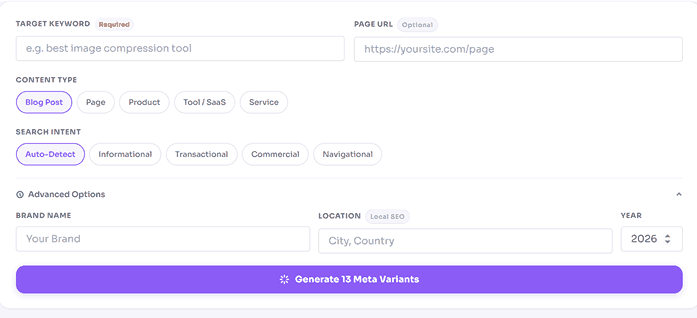
- Put in your target keyword—the main search term or phrase you want to rank for.
- Provide your page URL to ensure the snippet accurately reflects your content.
- Type your content type: blog post, product page, service page, landing page, category, or other.
- To increase trust and make your content more memorable, include your brand name.
- Include your city or region if targeting local searches. This step is optional.
- Add the current year to make your content feel up-to-date. This step is optional.
Step 2: Generate Different Options
- The tool produces 13 meta variants and descriptions designed to increase your click-through rate.
- Each option meets length guidelines and naturally uses your main keyword.
- You’ll see different styles, like benefit-focused, question-based, comparison, local, and brand-first approaches.
Step 3: Refine And Export Your Choices
- Pick your preferred tone: professional, friendly, urgent, authoritative, or playful.
- Choose brand placement: beginning, end, or not included.
- Set constraints: max pixel width targets, character ranges, and keyword inclusion rules.
- Export your selected snippets as a CSV for spreadsheet use or copy them directly to your clipboard for instant pasting. Use CSV for larger batch uploads or copying if you need quick one-off entries.
Step 4: Test And Make Better
- Follow straightforward A/B testing ideas and use a checklist to guide your experiments.
- In Google Search Console, keep an eye on how your click-through rate changes and use the tool again with the best settings.
Benefits of Using a Meta Title and Description Generator
- Boost your search visibility with clear, keyword-rich meta titles that help search engines understand your page and increase your chances of appearing for relevant searches.
- Next, get more clicks from your current rankings by using persuasive snippets that match search intent, so you can grow your traffic without needing extra content or links.
- Furthermore, rather than starting from scratch, generate dozens of on-brand options in seconds to save time on meta tags.
- What’s more, when generating SEO-friendly snippets, the output respects best-practice length limits, keyword placement, and readability for both users and Google.
- Alongside this, you can maintain a consistent tone and structure across hundreds of pages.
- To go even further, test smarter with built-in variations that let you run experiments and find out what works best for your audience.
- Moreover, achieve better alignment with on-page content by pulling context from your URL to prevent mismatches that trigger snippet rewrites.
- Lastly, spend less time staring at a blank field and more time picking the best option for your page.
Best Practices for Writing High‑CTR Meta Titles
- Begin with your main keyword if it fits naturally.
- Verify that your title aligns with the search intent. Use specific titles for informational searches, and emphasize offers or distinct details for transactional searches.
- Incorporate unique elements such as numbers, specifics, or outcomes. Examples: “7 Steps,” “Templates,” or “Pricing.”
- Your title should be between 55 and 60 characters long or 580 and 600 pixels wide. Look at how it looks on both mobile and desktop.
- Only use brackets or parentheses if they help you scan the text more easily. Don’t use them too much.
- If people look for your brand or trust it, add it. If not, focus on your main point.
- Don’t use the same parts of a keyword in your title more than once.
- Guarantee your title reflects the page content. If it doesn’t, audiences may exit quickly, requiring you to revise it.
How to Write Meta Descriptions That Get More Clicks
- Start by focusing on the searcher’s intent. State your page’s benefit or result clearly.
- Use your main keyword naturally, or a close variation if it flows better.
- Include important information like figures, procedures, formats, costs, or free resources.
- Match your tone to the page. Use a clear style for information, focus on value for commercial content, and build trust for sensitive topics.
- Finish your meta description with a gentle call to action, such as “See examples,” “Compare options,” “Start free,” or “Learn how.”
- Maintain your meta description at 150–160 characters, or the equivalent in pixels.
- Ensure your description matches the page. Don’t promise content you can’t deliver.
- Discover [Outcome] with [Primary Keyword]. See [specifics] and start [action] today.
- Compare [Primary Keyword] options, pricing, and examples. Find the facts before you decide.
- Get [Primary Keyword] templates, tips, and common mistakes to avoid. See what works in [Year].
- Find the best [Primary Keyword] in [Location]. Check reviews, availability, and options near you.
Who Should Use This Meta CTR Booster
- Bloggers can attract more readers to their tutorials, lists, and reviews while saving time, thereby growing their audience more efficiently.
- SEO professionals can maintain consistent messaging across large websites using proven snippets, ensuring site quality and trust.
- Marketers can speed up campaign launches by generating meta tags that are on-brand and conversion-focused, helping hit campaign goals faster.
- Website owners can increase site traffic and engagement by making a few simple CMS updates, directly improving visibility and results.
- E-commerce teams can highlight product strengths—such as shipping, pricing, or stock—through targeted snippets, making listings more appealing to shoppers.
- Local businesses can boost local intent by adding geo-modifiers and service details.
- Agencies can streamline their operations, speed up audits, and deliver results to clients more quickly.
Boost your CTR with NexezTool’s Free Meta CTR Booster
Examples and Templates
- [Main Keyword]: Comprehensive Handbook for [Audience] ([Year])
- Best [Primary Keyword] in [Location]: Reviews, Pricing, and Availability
- Checklist & Templates | [Brand] | [Primary Keyword]
- Pros, Cons, and Costs of [Primary Keyword] vs. [Competitor]
- Top [Number] [Primary Keyword] Tips You Can Use Today
- For Novices, [Primary Keyword]: Step-by-Step
- Master [Primary Keyword] with step-by-step examples and templates. Start now.
- Compare prices, options, and reviews for [Primary Keyword]. Make a decision with confidence.
- Get [Primary Keyword] tips that worked in [Year]. Use this method that has worked for others.
- Locate [Primary Keyword] in [Location] now. See availability and book instantly.
- Please use our free [Primary Keyword] tool to quickly come up with ideas, titles, and descriptions.
Implementation Tips and Technical Notes
- Pay attention to rendering limits, which refer to how much text search engines display. Focus on pixel widths, not just character count. Use the tool to help with this.
- Assign a unique meta title and meta description to every page to prevent duplication.
- Align H1s and titles. They do not need to be identical but must convey the same message.
- Implement structured data. Rich results can enhance strong snippets and increase CTR.
- Monitor Google snippet rewrites. If frequent, review page alignment with search queries.
- Consider localization carefully. For multilingual sites, tailor keywords and tone for each region instead of just translating.
- Prioritize accessibility. Use clear language to benefit all users and improve performance.
Click-Through Rate (CTR)
FAQ: Meta CTR Booster
Do you think meta descriptions help you rank?
Not directly—but craft a catchy one and watch your clicks soar, boosting traffic and supporting your SEO goals.
What length should I use?
Speaking of length, aim for titles around 55-60 characters and descriptions between 150 and 160 characters. For more accuracy, check how they look in pixels.
Do you think I should include the year?
Another common question is whether to include the year. Add the year when up-to-date information matters, like for trends, pricing, or statistics. Leave it out for pages that stay relevant over time.
Do you know if I can use emojis?
You may also wonder about using emojis. Use them only when they clarify your message, and keep them to a minimum. Some emojis may not appear the same across devices or may look spammy.
How many keywords should I include?
When it comes to keywords, use one focus keyword and, at most, a close variant. Prioritize natural language.
How often should I test?
And lastly, how frequently should you test? Check high-traffic pages once a month or whenever you see a decline in clicks or new competitors.
Roadmap and Ongoing Improvements
- Unlock powerful CTR insights with the enhanced Search Console integration.
- In addition, select from templates tailored to SaaS, e-commerce, local services, travel, and health industries, ensuring relevance to your specific needs.
- Next, review how your headlines score on clarity, intent match, and originality.
- Furthermore, preview how your page will appear in search results, including the favicon, site name, and site links for a comprehensive overview.
- Finally, streamline collaboration with built-in approvals and commenting features for efficient teamwork.