
Fancy Text Generator
What the Tool Does
Unicode, Not Images
Designed for Everyday Use
More Than a Basic Generator
Visual Evidence
Main Interface Preview
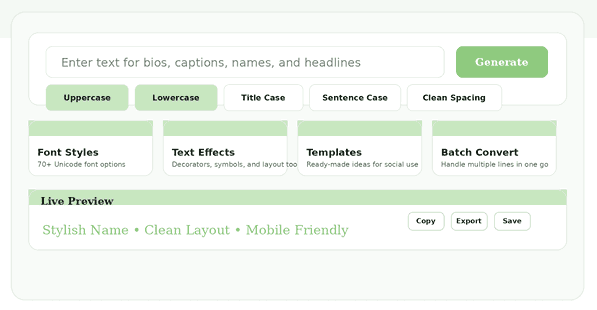
Feature Value
Wide Style Range
Fast Live Preview
Quick Text Actions
Organized Feature Cards
Templates that Reduce Friction
Compare Before Copying
Screenshot Of The Function
Feature Cards Overview
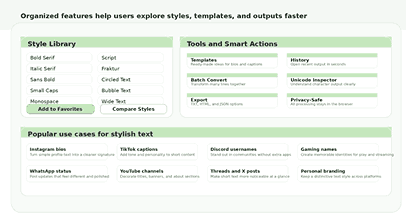
Convenience and Trust
History and Saved Picks
Easy Export and Copy
A Privacy-Friendly Flow
Honest Compatibility
Where People Use It
Social Profiles and Bios
Gaming and Community Names
Branding for Small Businesses
Captions, Quotes, and Headings
How It Operates
Simple Three-Step Flow
Why Simplicity Helps SEO
Better Than Image-Based Styling
Improve your content using this tool
For advanced content optimization, try our internal SEO tool: Document Formatter and Text Analyzer.
Additional external resources include:
Mobile Strength
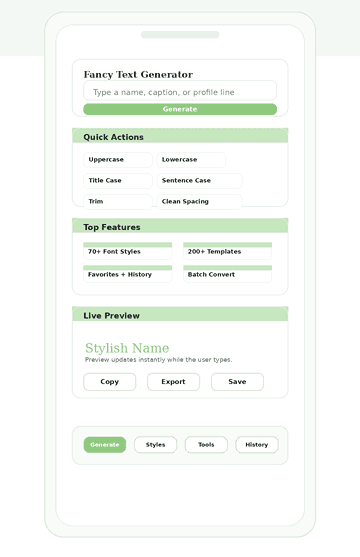
Built for Smaller Screens
Thumb-Friendly Layout
Responsive Screenshot
Frequently Asked Questions
What can this tool do?
Who is this tool useful for?
Can it help with repeated tasks?
Why is the preview section important?
Does the page work well on mobile?
Why do quick actions matter?
Can users test more than one style?
Would someone return to this page?
Can the tool handle both short and longer texts?
Does it make the interface feel easy to use?
Why are feature cards useful?
Does the tool support both creative and practical use?
Why does a clean design matter on a text tool?
How to Use the Fancy Text Generator
- Hello and welcome! Just type your text below whenever you’re ready to start.
- Next, choose a font style you like, or click Magic Randomiser for a surprise!
- Experiment with gradients, shadows, neon effects, or energise your text with fun emojis!
- Watch your new text change as you go, and just copy or download it when you feel ready!
Benefits and Features of the Tool
For Invitations
For Daily Use
Readable Output
Clean Formatting
Beginner Friendly
Workflow Value
Consistent Design
Real Convenience
Tips to Enhance the Style of Your Text
- Why not try mixing fonts to give your work a special flair?
- Consider adding a gradient to your text to really make it pop!
- Emojis are a fun way to highlight your message and show some personality!
- Batch-generation tools can quickly help you create great captions or bios!
- First, add a shadow around your text. Next, apply a glow effect. Adjust their intensities to achieve a 3D or neon appearance.
Why It Stands Out
The fancy text generator is straightforward to use immediately, but as you become more familiar with it, more advanced features become available.
With the ability to quickly change text case, modify styling, use different workflows, save your work, and utilize useful utilities and a simple review area, it caters to both quick edits and regular, stylized text creation.
Final Impression
A good fancy text generator instantly transforms plain text into eye-catching designs. You can quickly get started with user-friendly formatting tools, feature cards, and a visual preview.
The interface works smoothly on both desktop and mobile, allowing you to style text wherever you are. Its design enables you to generate attractive text rapidly, copy, save, or compare results, then use them wherever you post or share.