
AI Bot Robots.txt Generator and Checker
Non-standard directive; Google does not support Crawl-delay.
Heuristic checks only; these scores are not search-engine ranking scores.
Control AI Crawlers Without Hurting Search Visibility
The Evolution of AI-Driven Web Crawling
AI search is changing how we search for websites. Search engines still crawl pages for traditional ranking purposes, but AI assistants, model-training crawlers, answer engines, and user-triggered browsing agents visit websites for many other purposes. A standard robots.txt file can quickly become confusing due to the various types of crawlers.
AI Bot Robots.txt Generator – Simple crawler management
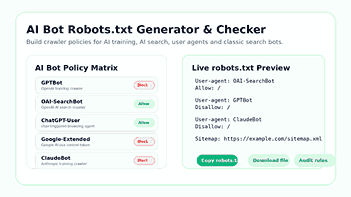
This AI bot robots.txt generator helps you generate a clean crawler policy in minutes. You can activate helpful search crawlers, deactivate AI training crawlers, test URL paths, and copy a ready-to-use robots.txt file without having to write the rules yourself. The goal is straightforward: control access, protect valuable content, and keep the top pages visible in search results.
Easy Ways to Handle Different Web Crawlers
Want a simple, optimized way to deal with crawlers like GPTBot, OAI-SearchBot, ChatGPT-User, Google-Extended, ClaudeBot, Claude-SearchBot, PerplexityBot, CCBot, Googlebot, Bingbot, and more? Here is the tool for you.
What Is an AI Bot Robots.txt Generator?
An AI bot robots.txt generator is a tool that generates robots.txt rules for modern AI crawlers and traditional search engine bots. You select the bot, you select allow or block, you add your sitemap, and you create a structured file you can upload to your website root instead of copying and pasting random codes from different blogs.
Additional Features of Top Rule Generation Tools
The best generator does more than just print simple rules. It discusses crawler types, differentiates between training bots and search bots, checks for conflicts, and helps you understand what each rule might do before you publish it.
Read about robots.txt file limitations
This matters because robots.txt is not a privacy firewall. It tells friendly crawlers which URLs they are allowed to crawl. It doesn’t password-protect private pages, remove indexed URLs from Google, or stop every scraper on the internet. That should be straightforward for a professional tool but still give website owners useful control over respectful crawlers.
Why AI Crawler Control Matters Now
Flexibility of Visibility Control
At the moment it gives website owners another option for controlling visibility. Is AI scanning the contents? Would they learn from it? Can AI search engines quote it? Should browsing agents activated by users be allowed to access help if a human asks for it? These are different questions, so a single “block all bots” rule often causes more problems than it solves.
Customized Crawler Access
For example, a publisher wants to locate public articles with a ChatGPT search or Claude search but doesn’t want to train crawlers to use that same content for future model datasets. You might want Googlebot and Bingbot to crawl product pages, but not low-value filters, internal search URLs, or duplicate pages. A SaaS company, for example, may want to allow AI search tools to access its documentation pages but block access to staging, admin, and account URLs.
Clear Robots.txt Strategy
An effective robots.txt strategy makes those decisions clear. It provides crawlers with a public instruction file, minimizes accidental crawl waste, and helps you keep pace with your technical SEO as AI discovery ramps up.
Search Crawlers, Training Crawlers, and User Agents are not the same
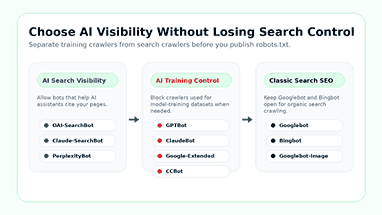
One common mistake is to assume all AI user agents are equal. Some bots are for training, some are for search visibility, and some only see a page when a person asks an AI assistant to visit a site. You want to treat these categories differently, rather than having a blanket rule for everything in your robots.txt policy.
Crawling Training
Training crawlers can gather publicly accessible content to improve models, build datasets, or serve other AI systems. Some examples of such crawlers are GPTBot, ClaudeBot, Google-Extended, CCBot, etc. Each of these entities provides documentation and purpose for its crawler. If you want to disallow some crawlers from using your public content to train or collect large datasets, you can add specific disallow rules for those user agents.
AI Search Crawlers
Search engine crawlers help search engines find and cite web pages. They include OAI-SearchBot, PerplexityBot, and Claude-SearchBot. Blocking these crawlers will reduce the likelihood of your site appearing in the responses of these platforms. If your content strategy relies on AI search visibility, treat these bots as separate entities and don’t block them with training crawlers.
Then you can check the official OpenAI crawler user agents to distinguish OAI-SearchBot from GPTBot and ChatGPT-User.
The customer can also create an AI-friendly site guide using our free LLMs.txt generator to improve AI visibility.
User-Driven Agents
Real users ask an AI assistant to open a page, summarize it, compare it with another page, or pull data from it. It is for user-driven agents. These agents are usually reactive to user requests, rather than training crawlers.
AI can help user-driven agents improve public page visibility through AI-assisted browsing, research, troubleshooting, and comparison workflows. But by blocking these agents, you could be blocking your users from using AI tools to consume your public content.”
How to Set Rules for the AI Crawler
The tool enables site owners to specify robots.txt rules for AI crawlers, normal search crawlers, and user-driven agents.
Allowing and Blocking Crawlers by Policy
You can allow crawlers that respect discovery. You can block crawlers that break your content policy. You can tell the difference between search engine crawlers and AI training bots.
Distinguishing Between Search Engine and AI Training Bot
A good robots.txt file is simple, clear, and tested before it is released. The point is not to block everything indiscriminately. The goal is to find out what crawlers can see publicly available pages and what they cannot see private or sensitive pages.
What This Tool Can Do For You
Create AI Bot Rules in Minutes
This feature allows you to choose crawler policies without having to write each user-agent rule from scratch. You can choose the bot category, whether to allow or block access, add your sitemap, and see a live preview of the robots.txt file before copying or downloading the final version.
Control Training Crawler Access
You can block some user agents for the crawlers you use to train AI but let in the helpful search crawlers. You can stop some of the crawler bots from crawling your public content. This allows publishers, creators, and businesses more control over visibility and use of their content.
Keep Search Crawling Safe
A poorly implemented robots.txt file can unintentionally block important search engines, which can reduce your visibility. The tool distinguishes between old-school search bots like Googlebot and Bingbot and AI-centric crawlers, making sure users don’t accidentally block important public pages.
Once search crawlers can access your important pages, improve your Google snippet with Meta CTR Booster.
Make sure your Sitemap is accurate
This line contains URLs that crawlers are looking for, starting with the URL for the sitemap index file. Main site map: The index can be built from a custom sitemap file or from your SEO plugin. URL of live sitemap: http:// We cannot process your sitemap until you provide us with a live URL to access it. Look at your sitemap to find dead pages, redirects, expired pages, or staging pages.
Check Before You Publish
Before you upload, you can check the rules with the checker. You can scan for missing user-agent entries, duplicate rules, full site blocks, sitemap problems, and allow/disallow conflicts. That reduces the chances of publishing a file that looks fine but acts strangely.
Who Should Use an AI Bot Robots.txt Generator?
Content Creators and Bloggers
Bloggers post their guides, reviews, tutorials, and opinions. They want Google traffic and mentions in AI searches, but they don’t necessarily want every training crawler to use years of content for free. It allows them to choose a balanced policy without manually editing the code.
News & Publishing Websites
Publishers must implement a careful crawler policy, as search, AI answers, and syndicated discovery feeds can surface articles. The tool offers a more nuanced approach: grant access to crawlers that build visibility, deny access to crawlers that are in conflict with licensing or editorial policy, and add sitemap URLs that direct discovery.
WordPress Site Administrators
WordPress sites generally have SEO plugins, media libraries, category pages, tag archives, and generated sitemaps. A professional robots.txt file should never accidentally block important assets or disable public posts or pages. This generator provides WordPress owners with a cleaner start for crawler control.
Online Shopping
Online stores need to conserve their crawl budget and minimize crawling duplicate URLs. The crawler could waste time with product filters, sort parameters, cart pages, and account pages. It helps store owners build safer rules while keeping important product and category URLs discoverable by search crawlers.
SaaS & Docs teams
Documentation pages are generally beneficial for both search engines and AI answers. SaaS teams may want blocked private dashboards, app routes, login areas, and staging paths, even though there are already docs and help pages. A structured generator makes this setup easier to maintain.
SEO Agencies and Developers
This generator is useful for SEO agencies and developers to generate crawler policies for client sites and compare old and new robots. Test key paths and explain crawler decisions in natural language before launch.
Path testing can also reduce the back and forth between SEO teams, developers, and site owners before the file goes live.
Organizations can also use the Digital Text Analyzer Online to check word count, readability, and keyword balance before submitting work to clients.
How to Use an AI Bot's Robots.txt Generator
Step 1: Choose Your Crawl Strategy
Decide what you want to permit. If search visibility matters, ensure that important search crawlers and useful search-related agents are able to reach you. If content protection is more important, block the training crawlers and add stronger server-side controls to private areas. Robots.txt is a file of public instructions, not a security device.
Step 2: Select the Bot Policies
Use the bot policy matrix to establish allow/block/neutral rules for each crawler. Read the crawlers’ descriptions before editing any policies. Some crawlers are for training or data collection, others for better visibility.
Step 3: Enter your Sitemap URL
Enter the sitemap URL for the website. Most WordPress users will just use /wp-sitemap.xml or a sitemap index generated by their SEO plugin. You can use /sitemap.xml for custom sites. The generator appends the directive to the final robots.txt file.
Step 4: View the live preview
The live preview displays the plain text final rules. Please read the file before publishing it. Look for wide ‘Disallow:’ rules, duplicate user-agent groups, or any rules that might block public pages you want indexed.
Step 5: Execute the checker
Try the checker to test important paths before publishing. Test the homepage, a public article, a product or service page, a category page, the sitemap URL, and private paths such as /wp-admin/ or /account/.
The path tester helps you see whether a selected crawler can access the URLs you care about under the current rules.
Step 6. Download or Copy Files
If the audit is clean, you can download the robots.txt file or copy the rules. Put it in the root of your domain so that it is available at http://example.com/robots.txt. Publish the file and then check the final URL to see if it is coming up as plain text.
Example Robots.txt Strategy for AI Search Visibility
This example allows users to do AI searches and browsing but blocks popular AI training crawlers. Use it only as a basis. Your final file should be consistent with your content policy, platform rigor, and SEO goals.
User-agent: OAI-SearchBot
Allow: /
User-agent: ChatGPT-User
Allow: /
User-agent: Claude-SearchBot
Allow: /
User-agent: Claude-User
Allow: /
User-agent: GPTBot
Disallow: /
User-agent: ClaudeBot
Disallow: /
User-agent: Google-Extended
Disallow: /
User-agent: CCBot
Disallow: /
User-agent: Googlebot
Allow: /
User-agent: Bingbot
Allow: /
Sitemap: https://example.com/sitemap.xml
This setup is used to inform several AI searches and user-requested agents so they can visit public pages. It also blocks some of the training bots. Googlebot and Bingbot are still allowed to do traditional search crawling.
Example Robots.txt Strategy for Maximum AI Blocking
Other sites are much tighter. Such a strategy can make sense for private communities, premium publishers, original research libraries, data-heavy sites, or projects that are not reliant on AI search visibility. Before you use a broad block, carefully consider the tradeoff.
User-agent: GPTBot
Disallow: /
User-agent: OAI-SearchBot
Disallow: /
User-agent: ChatGPT-User
Disallow: /
User-agent: ClaudeBot
Disallow: /
User-agent: Claude-SearchBot
Disallow: /
User-agent: Claude-User
Disallow: /
User-agent: Google-Extended
Disallow: /
User-agent: PerplexityBot
Disallow: /
User-agent: CCBot
Disallow: /
Sitemap: https://example.com/sitemap.xml
Tighter files could see AI answers less visible. And crawler quality does matter. For private pages: secure with authentication, add ‘noindex’ if needed, and use server rules, firewall controls, or password protection.
Robots.txt Checker Features That Improve Safety
Syntax Review
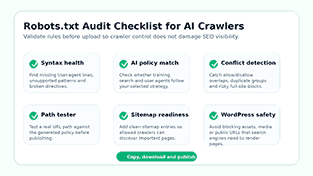
The checker looks for common formatting mistakes that are likely to break rules and make the file challenging to maintain. The clean syntax makes the instruction file more crawler-friendly and helps developers to review the policy faster.
If your notes on robots.txt are difficult to understand, try using the Free AI Text Refiner to make the explanation more digestible before sharing with clients or team members.
Duplicate Rule Identification
Over time, large robots.txt files tend to accumulate duplicate user-agent groups. Duplicates can confuse editors and create conflicting expectations. The checker will detect duplicate bot sections to help you clean up your file.
Alerts of Conflict
The Allow and Disallow rules may overlap. One page can be closed in one place and open in another. The checker helps you find risky patterns before uploading a file that affects important pages.
AI Policy Watch
An AI policy audit is a way to check whether your decisions are consistent with your stated goal. The tool can detect the inconsistency if you choose to block AI training but accidentally leave a training crawler open. If you want AI search visibility but block search agents, the audit can tell you about that trade-off.
URL Path Tests
One of the more useful features of a robots.txt checker is path testing. Provide a path and verify whether a specific crawler should access it. This allows you to test crucial pages before search engines or AI crawlers detect a bad rule.
Robots.txt Best Practices in WordPress
Don’t block your critical assets
Other search engines and Google require page rendering. Blocking important CSS, JavaScript, or media folders can make it difficult for search engines to understand the layout, mobile experience, or visual content. Keep public assets public unless you have a good reason to block them.
Control Area and Login Area
For most WordPress sites, you’ll want to lock down the admin, login, and inside URLs. It is common to block /wp-admin/, but you may need to allow /wp-admin/admin-ajax.php for your site to function correctly. Just make sure to test your theme and plugins before you turn on strict rules.
Keep your sitemap clean
Good sitemaps are a clean way to efficiently guide crawlers to the public pages you want found. Make sure that you have the sitemap URL and sitemap index updated to the ones created by WordPress or an SEO plug-in. And tidy up the old sitemap, redirects, staging URLs, and 404s.
Don’t Accidentally Block Public Posts
Prior to publishing, test a post URL, a category URL, an image URL, and the root URL. This simple check can catch many expensive mistakes. A robots.txt rule that blocks your money pages can limit crawl access and slow discovery.
Publish your robots.txt file and then use the SEO Reality Diagnosis Tool to check your page for crawlable content, internal links, and SEO signals.
Common robots.txt mistakes to avoid
Robots.txt to Hide Your Private Content
Robots.txt is not the right place for private data. Even a blocked URL can be tracked down from links, logs, browser history, external references, etc.
Require password restrictions, login protection, server rules, or other access controls to private content. If a public page is not showing in search results, apply a proper noindex method where applicable.
Blocking Googlebot with a Generic Rule
A generic user-agent rule may affect many compliant crawlers, including search bots. Use broad disallow rules only if you know what you’re doing. Most public websites should have more specific crawler rules than simply blocking every bot by default.
Block AI search bots when you need AI visibility
AI answer engines need to surface or cite your content. Blocking AI search crawlers and user-initiated agents can reduce AI discovery. Treat search visibility and separate training control as different categories, not the same.
Forget the sitemap
There is no requirement for a sitemap line within the robots.txt file, but it is a beneficial practice to include one. This helps crawlers to find the list of your clean URLs and improves the technical completeness of the file.
Only upload if you are sure
Please ensure that you test the robots.txt file before publishing it. One wrong line and the crawler is locked out of a key section of the website. Preview the file, review the audit summary, and test the key paths before uploading to the live domain.
Discover more SEO and writing helpers inside the NexezTool Suite before it goes live.
Why This Tool Is Better Than a Basic Robots.txt Generator
What Today’s Robots.txt Needs
The simplest robots.txt generator will usually ask you for a few folders and then spit out a simple file. But that’s not enough for modern websites. Now the AI crawlers have different purposes, and website owners need a clearer way to manage them. It’s AI crawler control, search visibility, WordPress safety, path testing, and audit checks in a single workflow.
Easy-to-use interface
The interface is useful for non-technical users as well. Choose a bot, read its purpose, pick a policy, and see the result instantly. This makes it easier for bloggers, agencies, publishers, and businesses to control crawlers without having to edit the raw rules from scratch.
SEO Expectations Realistically
The tool also brings a more honest SEO workflow. That doesn’t mean robots.txt will stop all scrapers. It gives compliant bots a clean policy, warning of limitations and promoting better protection for sensitive content.
When is the right time to let AI crawl your website?
When the relevant crawlers are present, AI-powered search, browsing, summaries, and comparison workflows are more likely to discover public pages. This is perfect for public blogs, product guides, tutorials, documentation pages, and comparison articles.
Crawlers don’t give you direct visibility, but blocking the wrong crawlers can reduce the chance of discovery.
That can also improve the user experience by enabling user-triggered agents. An AI assistant can ask a prospective customer to compare your products, summarize your documentation, or open a pricing page. If the user agent can reach the page, then your content has a better chance of being in that flow.
When should you block AI crawlers?
Block AI Crawlers for Sensitive Content
Block Ai crawlers if the content policy says so. You should block AI crawlers for premium articles, original data sets, licensed content, community discussions, paid research, private documentation, legal documents, or any pages where automated reuse poses a business risk.
Limit Unhelpful or Resource-Intensive Bots
You can also block crawlers that slow down servers, ignore your content strategy, or don’t provide any clear benefit. For high-value sites, robots.txt can be one part of a broader crawler management plan that also includes analytics, log review, firewall rules, and legal policy.
Build a stronger AI crawler policy
Improved Robots.txt Handling
Modern robots.txt files should do more than just block a few of the folders. It needs to be aligned with your search strategy, AI visibility goals, and content protection policy. This AI bot robots.txt generator provides you with a faster way to create that file, validate it, and publish it with more confidence.
Customized Crawler Access
This allows crawlers that help your site to be found; keeps your WordPress, e-commerce, or publishing site technically cleaner; and blocks crawlers that are not in line with your policy. A clear crawler policy isn’t a silver bullet for all AI scraping issues, but it’s a professional first layer of control.
Frequently Asked Questions about AI Robots.txt Generator
What is the best robots.txt generator for AI bots?
The best AI bot robots.txt generator must be compatible with today’s AI crawlers and classic search bots. It should have a live preview and path testing, support for sitemap entries, and policy audits. It also needs to describe the difference between training crawlers, search crawlers, and user-initiated agents.
Can robots.txt block all AI bots?
No. Robots.txt can tell compliant crawlers not to crawl, but not all scrapers, malicious bots, or copying without permission. “Robots are not a security concern. Provide login protection, server rules, firewall controls, or other methods to protect private or sensitive content. Next, you will need to assemble the parts.
Should I block GPTBot?
If your content policy does not allow that crawler access to your public pages to train models, then block GPTBot. If you still want visibility in AI search or user-triggered browsing, treat search and user-driven agents separately, instead of blocking every OpenAI-related user agent.
Should I block OAI-SearchBot?
Block OAI-SearchBot only if you do not want that specific crawler to access your public pages for AI search-related discovery. Do not confuse it with Googlebot, Bingbot, or other traditional search crawlers. If you want AI search visibility, you may choose to allow OAI-SearchBot while managing training crawlers separately.
What is Google Extended?
Google-Extended is a Google tag that publishers can use to manage some AI uses of their content. Please note that this activity is not typical Googlebot crawling for Search, so it should be handled differently instead of blocking Googlebot.
Does this tool work with WordPress?
Yeah. Site owners using WordPress can add sitemap entries, define crawler rules, protect common admin paths, and test important URLs before going live. Always double-check your exact WordPress paths before uploading the final robots.txt file.
Where do I upload the robots.txt file?
Please upload the robots.txt file to the root of your domain. For example, if your site is example.com, the file should be accessible at example.com/robots. Subdomains generally require a separate robots.txt file of their own.
Does robots.txt remove pages from Google?
No. It is controlled by robots. It doesn’t always take URLs out of Google search results. You don’t want noindex, passwords, or removal tools to be indexed. You’re in control.
Can I add multiple sitemap lines?
Yeah. If your site has more than one sitemap file, you can add more lines to your robots.txt file. Make sure your URLs are clean, accessible, and up-to-date.
How often should I update robots.txt?
Test it every time you add a new section, upgrade your SEO plugins, release a new sitemap, redesign your website, or change your AI crawler policy. The names of AI bots and the purposes of crawlers change, so it’s good to check in from time to time.