
Free LLMs.txt Generator
Nexez Tool
Create, review, and export a focused llms.txt v2 draft entirely in your browser.
Privacy first: your website data stays in this browser. No website details are uploaded, stored, or sent to an external API.
Start with the minimum useful information. Open Advanced Details only when you need more control.
Advanced Details
Build and clean common URLs locally. Suggested pages are not fetched or verified online.
Add only useful public resources. Less common sections stay collapsed to reduce clutter.
Important Pages Core pages an agent should understand first. 0 items
Blog Articles Useful articles, guides, tutorials, and educational posts. 0 items
Documentation Links Docs, help pages, manuals, and guide URLs. 0 items
Product or Service Pages Main products, services, pricing, or solution pages. 0 items
Contact/About/Legal Pages Contact, about, privacy, terms, and legal pages. 0 items
Social Profiles Official social profile URLs. 0 items
Recommended Pages for AI Systems Pages that deserve extra priority for AI systems. 0 items
Optional / Lower-Priority Pages Secondary public links that may be skipped when context is tight. This is not access control. 0 items
Custom Section Builder Create extra file-list sections with a title, URL, and optional description. 0 items
Paste existing content or import a local .txt, .md, or .json file. Files are read only in your browser.
Free LLMs.txt Generator
How to build a well-organized llms.txt file
How to create a clean and organized LLMS.txt file for your website without coding. Check quality signals, optimize URLs, and create a file to upload in minutes. Use the free text generators provided by these LLMs to add your website’s information and categorize important pages.
Advantages of a Clean llms.txt File
AI tools work much better when they can quickly understand what a site is about. A clean LLMS.txt file is a laser-focused map to your brand, public pages, documentation, products, services, and content priorities. You provide a simple guide in plain markdown. You don’t have an AI system figure out complex page layouts.
How to Use This Guide to AI and SEO
Follow this guide as a practical starting point for AI visibility, answer engine optimization, and future-proof technical SEO. Simple, private, and straightforward for beginners, but with enough control to customize each section for advanced users.
What is the llms.txt file?
Goal of llms.txt
The llms.txt file is a plain-text Markdown file that lives at the root of your website, i.e., yourdomain.com/llms.txt. It gives large language models a summary of your site and points them to your most important pages.
The llms.txt file follows the idea of the proposed llms.txt standard, which helps AI systems understand important website information.
llms.txt contents typical
Usually, it’s your website name, a brief description, main sections, important links, and directions for AI systems. Use it to display your homepage, documentation, product pages, blog hubs, support pages, policies, and any other publicly available content that really defines your brand.
How llms.txt Fits with Other SEO Tools
Think of it as your helpful AI content map. It does not replace your sitemap, robots.txt, schema markup, internal links, or regular SEO work. This lets you put your most important information in a form that is easier to interpret by AI systems.
XML sitemap – guides search engines to find important URLs. The file ‘llms.txt’ indicates the content priorities for AI systems.
Why Use a Free LLMs.txt Generator?
One can create an llms.txt file manually, but most website owners would prefer a guided workflow. A free LLM.txt generator removes the guesswork of creating a file with the right sections, clean formatting, and useful page descriptions.
Cross-Platform Support and Output Preview
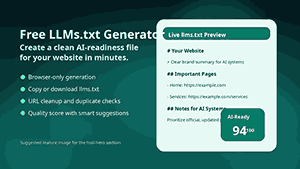
This free LLMs.txt generator works well on Windows, Mac, iOS, and Android. Preview final Markdown output before copying or downloading. The preview is not informative, the descriptions are poor, there are duplicate URLs, and they could be structured better.
Time-Saving Features to Manage Multiple Links
Saves time if you have many links. Duplicate rows and reorder sections Create common page sets, bulk paste URLs, and delete duplicates. These features enable you to create a cleaner file more quickly than by editing plain text files.
Who Should Use This LLMs.txt Generator?
This free LLM.txt generator is perfect for bloggers, SaaS teams, e-commerce stores, agencies, documentation websites, local businesses, news sites, education projects, portfolios, and tool sites. A well-formed llms.txt file can tell you what a public website is serving.
How llms.txt Helps Different Types of Websites
The file is useful for a blog because it directs AI systems to Evergreen guides, category pages, author pages, and editorial policies. Features: pricing, docs, integrations, and tutorials Support Resources: An online store can have product categories, policies, a buyer’s guide, and customer service pages.
Simple ways to create your llms.txt file
No technical expertise needed. All you need is your website’s URL, a clear description, and a list of important pages. The Free LLMs.txt The Free LLMs.txt The generator formats it for you, and when you’re done, you’ll have a file you can download.
How the Free LLMs.txt Generator Works
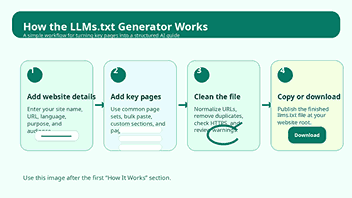
The free LLM.txt generator has a simple workflow. First, you add your website name/website URL/website type/language and description. Then you put your main purpose, target audience, brand summary, sitemap URL, robots.txt URL, and notes for AI systems.
Then you just add links to useful sections, like important pages, blog posts, links to documentation, products or services, contact pages, social profiles, recommended pages, restricted pages, and custom sections. Each row has a title, URL, and short description.
Finally, you will review the live output inside Free LLMs.txt Generator, check the quality score, fix warnings, and download your LLMs.txt file. You’ll also be able to copy upload path suggestions, references to robots.txt, and an HTML link tag to help you further with implementation.
Step 1. Enter the website information
The information website basically is about the following facts: Website Name: URL, Main Language: English, Website Type: Digital Library. The free online library contains more than 60,000 free e-books. This is a straightforward, direct statement: AI systems require a clear description of who you serve and what your site provides.
Saying “we provide useful information” is not an effective way to communicate. NexezTool offers creators, marketers, and website owners free browser-based SEO, writing, imaging, and documentation tools. Making LLM.txt files more useful with explicit context
Step 2: Add Important Pages & Links
There’s no need to list every single low-value URL in your llms.txt file. It should identify the pages that best represent your site. The llms.txt file should include the following pages: Home Page Main Tool Pages Product/Service Pages Core Guides Contact Page The About Us Page, Privacy Policy, and Support Resources are all important sections of our website.
“Link descriptions should be short. A title tells you where a page is, and a description tells you why it matters to AI systems. That’s especially useful for tools, docs, product categories, and educational material.
3. Clean and normalize URLs
Messy URLs make your file vulnerable. It can get cluttered with tracking parameters, duplicate links, uppercase variations, long query strings, and inconsistent trailing slashes. The generator has a choice. Clean and normalize URLs to tidy up your links before they are exported.
It also can notify you of any invalid URLs and HTTP links. Use HTTPS URLs and canonical page versions, if possible. Clean URLs make the finished file look more professional and help reduce confusion for anyone who will be looking at it later.
Step 4: Review the Quality Score
The quality score tells you if your llms.txt file is ready to be published. It looks for key indicators like website name, a valid URL, a clear description, the main purpose, a sitemap URL, key pages, contact information, notes, HTTPS usage, and any duplicate URL issues.
And just because you have a high score doesn’t mean you’ll be included in AI search results. There is a lot of practical information in your file. Use the score as a checklist, then have a human look at the final text before uploading.
Step 5: Download a file or save it
If the preview is OK, copy the output or download the file as llms.txt. Upload it to the root of your website so the file is accessible at yourdomain.com/llms.txt. Post. Now open that URL in a browser and watch the file load fine.
Updated LLMs.txt Return to the file and add bigger pages, alter your navigation, add new products, update the documentation, and change the focus of your business. Old files can emit stale signals.
Best Practices for Better AI Readability
Sections and headings
Organization
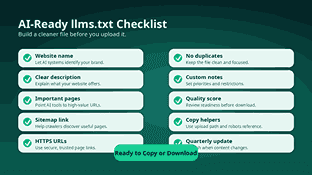
Separate sections. Documentation, tutorials, products/services, AI Systems, recommended pages, Excluded pages or low-value pages. Clear headings provide a quick way to scan the file and the important pages.
Set up simple Markdown formatting, short descriptions, and clean headings so the file remains straightforward to scan.
Writing Effective Page Descriptions
This section provides a brief description of the content. A short sentence or two is better than a long one. What can the user do, learn, compare, or solve on the page? Good descriptions clarify, not bloat, the file.
Making URLs Clean and Correct
Canonical URLs: Duplicate pages: None. Remove tracking parameters, session IDs, fragments, and unwanted query strings. The file is small, so it is straightforward for humans and machines to read.
Keeping llms.txt Up to Date
Change the file if you change your site. Every time you release a new tool, write a large guide, revamp your documentation, or introduce a new service, you update your llms.txt file. Your AI-ready content map should reflect what you already have on your site.
How to Upload Your llms.txt File
After downloading the file, upload it to the root directory of your website. The last public path would be yourdomain.com/llms.txt. Usually, you can upload via WordPress’s hosted file manager, an FTP client, or your server’s control panel.
How To Publish And Update llms.txt To Your Website
Upload the file and test it in your browser. If your file opens fine, it is public. You can also add a reference in robots.txt or an HTML link tag that senses your technical setup.
Uploading and Testing of llms.txt for Public Access
Later, if you update the file, just replace the old version with the new one. Make a backup copy if you’re working on large sites or client projects.
Example llms.txt Structure
Example Site
Example Website helps creators build faster with free browser-based tools.
Website Details
URL
Type: Tool site.
language: English
Site map
Important Pages
Home.
The website’s main landing page.
Online Tools
Directory of free online tools.
AI Systems Notes
Below, we summarize this website’s current, public, and canonical pages. Summarize this page. This site is summarized.
Key Features that Make this Tool Useful
This free LLMs.txt generator is not a blank text box; it’s filled with useful features to help you generate a better file. It provides structure, quality checks, live feedback, and export options and a smooth workflow.
Live Preview Manual Generation
Live preview updates as you type so you can see your markdown file come together. To have more control, you can use the manual generation option and update the preview whenever you want.
Copy & Download Buttons
Exporting is effortless with the free LLMs.txt generator. You can copy the last text to your clipboard or download it as a ready-to-use llms.txt file as follows: This gives WordPress users, developers, marketers, and website owners a simple way to publish.
Reusable page components
Each section can have as many rows as you want, and you can have them any way you want.” This will give you a file that looks like the structure of your website. You can show documentation before blog posts, product pages before policies, or recommended pages before restricted pages.
Smart Common Page Set Builder
Free LLM.txt Generator has a common page set builder, which gives you a nice starting structure depending on the type of website. For example, a SaaS website may require links to features, pricing, documentation, and a help center. Location Reviews About Contact Links Local Business Services
Bulk URL Paste & Auto Titles
Bulk paste: add many URLs at once. It speeds up the setup process and generates readable titles from URL slugs. Then you can refine the titles and descriptions.
HTTPS Alarm and Duplicate Detection
URLs are repeated, adding bulk and making your file less concise. It also finds duplicate links, so it removes duplicate page lines from the free LLMs.txt generator. It also tells you about URLs using HTTP instead of HTTPS so you can improve trust and consistency.
Import & Restore Configuration
If you already have a draft llms.txt, you can import it where applicable and improve it in the tool itself. You can also export and import backups in JSON format. This is handy if you want to step away from your work or use the setup again later on.
What Should You Include in an llms.txt File?
A good llms.txt should contain your website’s name and a brief description of your brand. It then breaks down your most important public pages into clear sections. We don’t mean to be comprehensive. The point is to show what is considered.
Recommended Pages to Add
Start with the homepage, about page, contact page, main category pages, key product or service pages, documentation, resources, and your best evergreen articles for most websites. Add policy pages to help build trust, or explain how your site works.
Prioritize Pages & Add Notes
The user’s name and email address can be specified when adding a new user. These notes can tell you which pages are priorities, which are outdated, or how AI systems should talk about your website. Be honest and thorough in these notes.” Don’t invent it.
Robots.txt, Sitemap.xml and LLMs.txt
Various roles of llms.txt, robots.txt, and sitemap.xml
The llms.txt, robots.txt, and sitemap.xml files each serve different purposes and are not the same as one another. No, the original text of the file has changed. Each is to support a different aspect of crawling, of discovery, and of machine understanding.
What are the functions of robots.txt and sitemap.xml
The robots.txt file tells crawl bots where they can and cannot go. Sitemap.xml is a list of important pages that helps search engines find URLs. LLMs.txt provides AI systems with a custom description of your site, highlighting your most important pages and content priorities.
How These Files Assist Site Health
All three can be used to build a healthy site.” A sitemap helps search engines crawl your site more effectively. Robots.txt controlled crawl. Your llms.txt file is a structured guide for the AI, valuing meaning, context, and page priority.
Why Privacy Matters in LLM .txt Generators
LLM.txt Generator for Website Owners: Privacy-Focused
When preparing structured files, website owners will often include sensitive business contexts, lists of pages, draft notes, and internal priorities. Why do we need a privacy-respecting free LLM.txt generator? Generators matter: you may not want that information going to third-party services.
Create LLM.txt Securely & Privatelyly
This free LLM.txt generator works in your web browser. No external APIs, external CDNs, external fonts, logins, database tables, or data storage are needed. This makes it a handy tool for users who want a simple solution without sending their website details off for processing.
Why a Browser-Based LLM.txt Generator
Your work is yours once it is published. Preview the final output carefully before you publish it. In addition to the above, I wanted to mention that there is a difference in the process for the user and the user’s role configuration.
Mistakes to Avoid
Guidelines for Handling the llms.txt File
The llms.txt file is not a document full of keywords. AI systems should respond to facts on file, not to artificial repeating phrases. Be helpful. Keep it short. Be correct.
I don’t know the methodology. If the page is no longer in the file, it should be removed. If a page redirects, use the final canonical destination. Clean links boost credibility.
Best Practices for llms.txt and Content Management
We would rather not make any promises we can’t keep, including the contents of LLMs. text. However, the file “llms.txt” can help describe how you present your content, but it won’t guarantee your rankings, citations, or traffic. Use the information as part of your overall AI SEO and content quality plan.
Considerations of Use, Accuracy, and Content
Do not ignore important trust pages. Pages such as About Us, Contact, Privacy, Terms, Editorial Policy, Author Pages, and Support Pages can help AI systems understand who’s behind the website and how users can verify the information.
How This Tool Helps On-Page SEO
Optimizing Content & SEO with the LLM.txt Generator
This free LLM.txt generator will help you organize your content and encourage an on-page SEO audit. When you’re considering which pages to include in your llms.txt file, you’re also considering which pages are important to your users and search engines.
LLM.txt For Better On-Page SEO
The process results in better page titles, better meta descriptions, better URLs, useful internal priorities, and fresh content hubs. The same improvements will benefit your standard SEO workflow by forcing you to think about relevance, intent, and information architecture.
LLM for better Website Architecture and Exposure.txt
Utilize the file you have with excellent titles, meta descriptions, schema markup, internal links, fast-loading pages, and quality information. While a free LLM.txt generator isn’t a substitute for SEO fundamentals, it can be a useful tool to prepare your site for discovery by AI.
Why This Tool Beats Others for Amateurs & Pros
Versatile and User-Friendly LLM.txt Creator
Guided form for novices. Intelligent defaults, transparent output. They won’t have to learn the format or write markdown from the ground up. Pros get repeatable sections, custom notes, backups, imports, validation checks, and a workflow they can use across sites.
Easy LLM.txt Creation for Beginners and Experts
The free LLM.txt generator interface is task-oriented. There’s no need for a complicated dashboard for users. It keeps all important actions close to the editor, including the preview, score, suggestions, copy, download, import, export, and cleanup tools.
All Skill Levels Task-Oriented LLM.txt Generator
This balance makes the Free LLMs.txt Generator useful for one-time users and agencies that prepare files for many customers. It helps each user to get a publishable llms.txt from a blank page with fewer mistakes.
When should you update your LLMs.txt file?
Rewrite the file when you publish major pages, release new tools, add categories of products, change your service pages, rewrite your documentation, update policies, or change your brand positioning. These changes affect how AI systems understand your site.
Site Changes and Maintaining and Reviewing Your llms.txt
Check the file for live sites every few months. Significant changes to small static sites should be reviewed. The goal is simple: keep the file in sync with the best, most current version of your content.
Final Thoughts
The AI discovery landscape is constantly evolving, and website owners need simple ways to surface their content. A successful LLMs.txt file is a clean, structured, machine-readable guide to your site to help AIs understand it.
The free LLMs.txt generator helps you make that guide without coding. This tool is easy to use for new sites, growing blogs, and professional SEO projects. LLMs.txt Generator.
Add your website details, tidy your key pages, tidy your URLs, check your quality score, and download your file. Generate an AI-friendly website map in minutes and keep it up-to-date as your content grows.
Frequently Asked Questions
What is a free LLM.txt generator?
llms.txt Generator is an online tool to generate a well-structured llms.txt file for your site. It walks you through the details of the website, important links, instructions for AI, and the export options.
Is llms.txt similar to robots.txt?
False. robots.txt is about crawler access rules. LLMs.txt: Context, priority of pages and AI-readable instructions You can use both files together; they solve different problems.
Where do I place the LLMs.txt file?
Just drop this file in your website root directory, and it will load at yourdomain.com/llms.txt. This location makes the file easier to discover and is consistent with the common implementation pattern.
Does llms.txt guarantee better rankings?
No, the llms.txt file does not promise rankings, AI citations, or traffic. It helps people notice your public content. But the results depend on many factors, much more than just one file.
Can I use this tool for a WordPress website?
Yes. It will create a sitemap for a WordPress website, and you can download the file to your desktop and upload it to your site’s root using your host, file manager, FTP, or any other means of server access.
Which pages should I be adding?
Home About us Contact us Top content hubs: Main product or service pages: documentation, sitemap, and key trust pages. Quality, not quantity.
How often do I refresh llms.txt?
Refresh it whenever you change your site structure or update your most important content. Many active sites benefit from a quarterly review.