Salary Calculator For Net, Gross and CTC

Employee & Region
INR ₹
Trust mode is enabled: country-specific logic is shown with clear assumptions, and regional overrides can be edited where needed.
Salary Components
Custom Allowances
Reverse Calculation
Reverse mode uses iterative convergence and shows the residual gap so you can judge estimate quality.
CTC Structure
CTC mode now solves gross iteratively against the same employer-cost logic used in the final breakdown.
Salary Hike Simulator
%
Hike mode keeps deductions visible and applies the hike on the exact base you choose.
Deductions & Contributions
Custom Deductions

Formula source

This calculator uses your entered pay details, your selected region, and its own deduction settings and payroll rules to estimate your salary.
 
In the mode you choose, it figures out gross-to-net and net-to-gross conversions. It can also show yearly CTC breakdowns or pretend to give people raises.
 
The tool actively defines terms when necessary: it shows you.
  • Gross pay is your total salary before deductions.
  • Pay after taxes and other deductions.
  • The “CTC,” or employer cost, is the total amount the company pays, including benefits.
  • Tax deductions.
  • Retirement or provident fund deductions” are employee retirement contributions.
  • State or regional overrides for changes to local laws.
  • Employer-side contributions are the benefits or deductions that the employer pays.

Assumptions

  • Use these results as estimates, only for planning and comparison.
  • Employers differ in salary structures by company, contract, and country.
  • Tax treatment, deductions, reimbursements, bonuses, and benefits may differ from official records.
  • You can edit the default salary templates as examples, but you don’t have to use them.
  • The tool uses iterative estimation in reverse and CTC modes and might show small rounding differences.
  • Always prioritize official payslips, HR policy, contracts, and local tax rules over this tool. Disclaimer:
You can use this tool for learning, making plans, and making estimates. Don’t use it for advice on taxes, the law, payroll, or money.
 

How it works

The results are based on the information you enter, the salary mode you choose, and any country, tax, filing status, or deduction options you set in the tool.

Overview

The Salary Calculator lets you see your salary, deductions, and take-home pay more clearly. No need to switch between spreadsheets or rely on guesswork. We simplify complex pay numbers into a clear, easy-to-read format from the start.
 
Most people don’t struggle because pay is hard to understand. The problem is that pay slips, offer letters, tax rules, and company structures all use different terms. One document lists gross salary. Another shows yearly CTC. A third discusses employer contributions. But the real question is, how much money actually goes into the bank account, and why?
 
This app gives you a practical answer. Compare your earnings, deductions, net salary, tax impact, and employer costs in one place. Planning a job change, negotiating an offer, checking for a raise, or reviewing a salary structure all become easier.

Understand your salary, simplified

A salary may look simple, but the details complicate it. One figure changes when you add basic pay, HRA, allowances, bonuses, PF, taxes, social contributions, and benefits.
 
The Salary Calculator adds up all these details, helping users understand exactly how each salary part affects their final pay, without needing to do the math. It clearly lists sources, deductions, and leftover money, demonstrating how each component impacts your take-home salary.
 

View gross salary and take-home pay side by side.

The tool clearly separates gross and net salary, letting users see how inputting each component directly impacts the pay before and after deductions.
 
This matters because many judge an offer by a single number, not realizing that a large package can actually result in lower take-home pay. The calculator reveals this impact up front, helping you avoid surprises to your finances.
 

Read the annual CTC in clear terms.

CTC may seem appealing, even though it can be hard to understand. People want to know about their take-home pay, employer contributions, and monthly pay.
 
The calculator breaks down yearly CTC and makes the impact clear. It shows employee and employer parts, monthly and yearly, so you see how each component influences regular income.
 

Plan naturally between monthly and yearly goals.
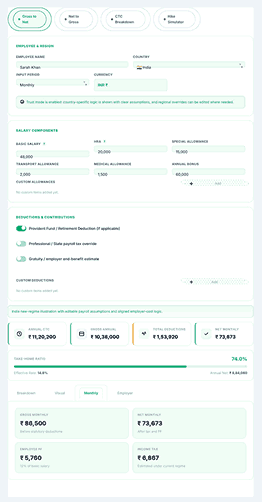
People see pay as monthly for budgeting or yearly for comparison. This tool bridges these views.
 
The Salary Calculator links monthly income and annual pay, showing how changes in one affect the other. This helps you better evaluate offers and reviews and plan your personal finances.
Salary Calculator dashboard showing salary modes, country selection, income fields, and salary breakdown summary Title: Advanced Salary Calculator Dashboard

Cleaner than manual salary sheets

A spreadsheet can be useful, but it needs the right formulas and tax logic. Careful formatting is crucial. A single error can alter the outcome and mislead about affordability, savings, or income.
 
Salary Calculator fixes that problem. It puts logic into its own interface. The layout is easier to read than a grid. The results are easier to explain to clients, employees, candidates, or family members.
 
Short, clear sections help people avoid common compensation mistakes. Many forget to separate what employers pay from deductions. Some think of the annual bonus as a monthly number. Others miss the gap between stated and actual take-home pay. A focused calculator reduces that confusion.
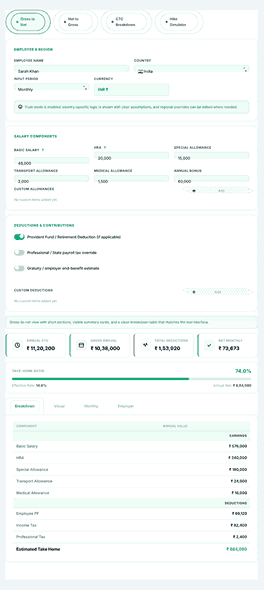
Gross to net salary breakdown showing gross pay, deductions, taxes, and final take-home salary

Gross to net salary calculation that feels straightforward

Most people need gross-to-net first. It starts with the pay structure. The tool shows how deductions change the final amount. This is the fastest way for many users to see if their job package is too comfortable, too stretched, or worth renegotiating.
 
The input structure is flexible and supports realistic salary setups. Salary Calculator supports common components: base salary, HRA, special allowance, transport allowance, medical allowance, and annual bonus. It does not force a single flat number. This makes the output look more like a real pay structure.
 

Follow the deduction path clearly, without confusion.

Deductions make salary talks frustrating. People hear words like “PF,” “professional tax,” “Social Security,” “Medicare,” “National Insurance,” or “employer contribution.” It’s not always clear how these amounts work together.
 
This calculator makes the deduction path clearer. It shows how tax and contribution rules work. Users can see the difference between required deductions, amounts paid by the company, and the final net value. That visibility matters for anyone looking at a pay structure for the first time.
 

Better clarity for employees, freelancers, and HR teams

Employees use gross-to-net calculations to understand their pay better. Freelancers and consultants use them to compare a salaried job to contract work. During offer talks, recruiters and HR professionals can show how a compensation package turns into real money.
 
That wide range of uses gives the tool an edge in daily life. Multiple user types can benefit from it. The tool is for anyone who needs a better sense of how money comes in and goes out.

Target take-home salary calculator

The most common question is, “What gross salary do I need to take home my desired monthly net income?” The reverse calculator provides the answer.
 
This mode helps with salary talks or job changes, especially when monthly needs are clear. The tool converts that number into the required gross salary.
 

Turn a target amount into a practical salary goal.

That small shift changes the conversation. Instead of just accepting an offer, users start with their real needs, and the tool calculates the required gross and annual packages.
 
This feature fits job seekers relocating, professionals comparing offers, or employees in reviews. It supports negotiation from accurate, goal-based planning.
 

Useful when life costs are already fixed

A family budget ignores pay structure. Rent, gas, school fees, groceries, and medical bills require cash, not just numbers on an offer letter.
 
The reverse calculator ensures salary decisions match reality. Understanding your needs lets you approach negotiations confidently, turning knowledge into empowerment and results.

Built for real-world salary structures, not idealized examples

Clarity and transparency in pay calculations make a calculator indispensable. Its core strength lies in component-based inputs—allowing you to enter basic salary, HRA, special allowance, bonus, and custom items rather than only a flat amount.
 
This feels less abstract. It’s easier to match the tool to real documents. It’s also simpler to explain the results to anyone checking the package.
 

Add custom allowances and deductions when you have a unique package

Workers don’t always use the same terms. Some include travel support. Others offer performance bonuses. Some have unique deductions. Calculators that ignore these differences are too rigid to help.
 
With the Salary Calculator, you can add or remove allowances and deductions as needed. This lets you set up a salary structure that matches real pay patterns so users can create a package that reflects what they actually receive or expect to receive.
 

Useful for different countries and pay systems

Earnings aren’t limited to one market. Professionals often look for jobs in different places. Employers need to explain pay in various regions. A tool that works across countries and tax rules helps modern hiring and salary reviews.
 
This makes it easier to think about moving, working remotely, or getting paid based on where you live. The tool also provides a better starting point, even for people new to tax terms.

CTC package destination details

A good salary tool should do more than display net pay. People also want to understand how their total compensation is structured, particularly when an employer offers a large annual CTC that appears impressive on paper but may feel smaller in practice.
 
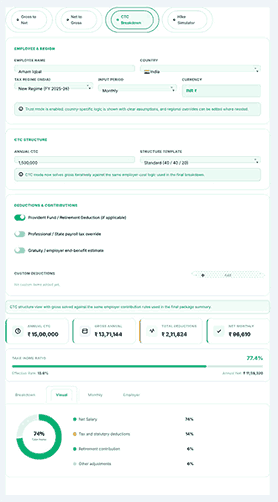
The CTC breakdown mode turns a single yearly figure into a clear layout, splitting it into basic pay, human resources administration, other allowances, and employer contributions, based on the selected salary mix.
CTC breakdown visual showing cost to company structure, employer contribution, deductions, and net salary estimate

Compare structure templates instead of relying on guesswork.

Not all businesses pay their workers the same amount. Compensation packages vary: some focus on basic items, others on allowances, while some are structured conservatively to balance monthly payout and benefits. Recognizing these differences is essential for accurate comparison.
 
This financial calculator includes salary templates that allow users to directly compare how various pay structures affect deductions, gross salary, and annual net income. Users can see how changing parts of a compensation package affects the final amount they receive.
 

In addition to structure comparisons, it’s important to understand employer contributions without mixing them into take-home pay.

When someone reads an offer letter, the employer’s contribution can make things less clear. In many cases, a big annual total might include benefits or company-paid portions that increase the company’s costs without increasing the employee’s direct monthly amount.
 
To make things easier, the calculator helps you separate those layers. This clarity not only enables a better understanding of the annual package but also allows for straightforward comparison to another offer that may have a different structure. Sometimes, this level of detail can make the difference between certainty and confusion when hiring or giving feedback.

Salary hike simulation for before and after comparison

The impact of a raise is often ambiguous. It can simultaneously affect gross income, tax liability, contribution levels, and net pay. Many people focus solely on the raise percentage, overlooking the actual take-home change without a proper comparison tool.
 
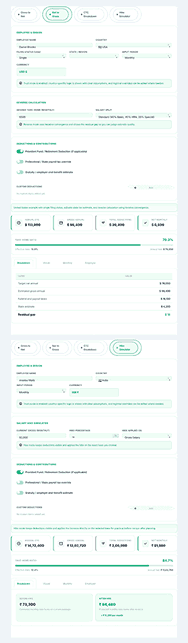
The raise simulator clarifies these effects. It enables users to view the exact financial impact by directly comparing existing and proposed salaries.
 

See the full picture before you accept a raise.

Many employees receive percentage raises each year and expect a larger benefit than they receive. In reality, increased pay can trigger higher deductions, so your net income may not rise as much as anticipated.
 
The simulator provides a clear side-by-side comparison of your compensation before and after a raise. This helps employees understand how appraisals affect them and enables managers to conduct transparent, informed pay discussions.
 

A smarter way to talk about raises than guessing
It’s easy to misjudge what a raise means. Simply adding the percentage to your salary often ignores changes in taxes and contributions, leading to unrealistic expectations.
 
This application excels by simplifying pay discussions. Displaying your current and new earnings in detail reveals where changes truly matter. This results in fewer misunderstandings and clearer expectations.
Reverse salary and hike simulator showing net to gross estimate, salary increase comparison, and updated pay summary

A more readable experience for people who do not love payroll language

Individuals ignore salary tools. They think they are payroll software. They prefer someone who explains things. The interface crowds the screen. Labels use too much technical language. The results table feels cold. It challenges readability.
 
This salary calculator is easier to use. It presents information clearly, making it simple for users to move between sections, view results in a clean layout, and understand the output. Jargon does not overwhelm them, so that they can focus on salary planning without added stress from the tool itself.
 

Suitable for both first-time job seekers and experienced professionals

A new employee opens an offer letter and calculates their monthly pay. A senior professional compares annual packages at two companies, each with different pay structures. Both seek clarity and may require different explanations.
 
This tool helps both new and experienced users. It clarifies technical salary terms so all users can understand their pay. It addresses common real-world money issues, easing concerns for users. For first-time users, it builds confidence. For experienced users, it offers structure to support their decisions.

Easier reporting and cleaner sharing

Sharing, reviewing, or saving a salary calculation streamlines communication of pay structures, making it easier for HR teams, consultants, finance advisors, and managers to share clear and consistent information without starting from scratch.
 
The Salary Calculator makes salary discussions easier by generating reports you can review, compare, and share. Export clear summaries to keep conversations going beyond one screen.
 

Useful when decisions need a second look

A single salary estimate often leads to more questions. Someone might want to review the result later, compare it to another offer, or show it to others. A calculator you can revisit and explain is more useful than a one-time formula box.
 
A well-structured result view helps. It turns a quick salary estimate into a clear record of how and why the number was made.

Why Use an Advanced Salary Calculator?

  • Conserves precious time
  • Ensures accuracy
  • Makes it easier to plan your finances
  • Supports you during income negotiations
  • Facilitates scrutiny of job offers
  • Consultants and independent contractors thrive with it.

Practical applications of this calculator

A candidate can use the tool to get a clear picture of their total compensation before accepting a job offer. Employees might check it before a performance review to understand how their pay is structured and whether it matches expectations.
 
HR teams can use it to model salary decisions confidently. Consultants can explain pay packages for clients more clearly, and founders can set transparent salary ranges for new hires.
 
The goal remains consistent in each scenario: individuals seek to understand their salary, its structure, and how it compares to others. Rather than unclear explanations, they value transparency about what their compensation package means in practice.
 

How the tool helps when comparing job offers

Comparing job offers can be tricky. One employer might offer a higher annual CTC, while another gives a simpler monthly payment. Another might include benefits that are valuable over time but easy to miss at first.
 
The calculator helps users see more than the headline salary. Breaking down each part, it highlights hidden differences in offers, making it easier to compare them accurately and choose what’s best.
 

How the tool supports annual reviews and planning

During appraisal season each year, employees often have similar questions about their compensation. What has changed? What does the new percentage mean for their monthly take-home pay? How much of the raise remains after deductions? How should they interpret the new pay package?
 
The salary breakdown and hike simulator facilitate these discussions. Users gain clarity by viewing the estimated impact, reducing the need for guesswork or assumptions.

Frequently Asked Questions

What does “take-home pay” mean?

Take-home pay is what you keep after taxes.
 

Can you use this calculator to figure out deductions and allowances?

Yes. You can add deductions and allowances.
 

How often do tax rules change?

Tax rules change yearly. Use current ones.
 

Is the calculated net salary accurate?

Sure, if the info is correct.
 

Does basic salary include benefits?

Basic salary is your fixed pay, before benefits.

Discover NexezTool's intelligent tools.

Optimize your productivity with our most popular tools:

Simple Grade Calculator

See grades, metrics, and how well you’re doing in school right away.

Merit Counter

Give admissions and exams accurate merit scores.

Trading Position Size Calculator

A tool for managing risk in stocks, forex, and crypto.

Looking for more finance and productivity tools? Check out the NexezTool Suite for more calculators, Excel helpers, and planning tools.

Why this tool feels more trustworthy than a rough estimate

Confidence matters when setting a salary. People rely on this data to choose where to live, budget, support families, or explore new careers. That’s why the calculator must be intuitive.
 
Trust builds when output is transparent, well-organized, and easy to interpret. Users see specifics: deductions, net pay, and employer costs—never left guessing. A tool that provides both results and clear explanations is preferable to one that reveals only a final figure.
 

A logical layout boosts user confidence.

Visitors are more likely to trust the computation if they can see every detail of the salary breakdown. They can easily review hypotheses, adjust numbers, compare scenarios, and carry out experiments.
 
This transparency makes the tool valuable, not confusing.
It also enables wiser decisions. Let’s look beyond single figures and evaluate pay more thoroughly.

Smart salary planning for everyday decisions

Money decisions are rarely abstract. They are linked to rent, family plans, savings goals, commuting costs, moving options, and long-term career growth. When a salary calculator ties pay numbers to real-life situations, it becomes truly useful.
 
That’s exactly what the Salary Calculator does. It makes income analysis easier and more organized. It helps users better understand gross pay, deductions, annual package structure, target take-home planning, and the effects of a salary increase. All this happens without adding unnecessary complexity.
 

The real value is clarity, not just calculation.

You can find a basic calculator online. Most people really need a tool that makes sense of the numbers in a way that is helpful, honest, and easy to go back to. That’s what makes this tool stand out.
 
It helps people read salary structures, compare results, get ready for conversations, and make better pay decisions. There is less confusion. That kind of clarity is not a flaw for workers, employers, consultants, or job seekers—it’s the intended outcome.

Salary regulations differ internationally

Different countries have different ways of figuring out salaries. Here is a picture:
 

Pakistan

  • In Pakistan, the income tax system is progressive. People who make more money pay more in taxes.
  • Provident Fund (where applicable)
  • Payments to Social Security

India

  • Indian income tax plans that change based on your age and how much money you make
  • Taxation for professionals (in some states)
  • The PF bylaw

USA

The Premium salary calculator has accurate tax settings for the US, UK, Canada, UAE, Pakistan, India, Germany, and France. It also has a manual tax mode that you can fully customize.
 
It is also available as an Advanced Income Tax Calculator for AY 2025-26 in South Asian countries such as Pakistan and India. HMRC (UK) and the Canada Revenue Agency (CRA) are two data sources.

How To Use the Advanced Salary Calculator

Step 1

Enter Your Basic Salary

Enter the exact basic salary that you earn or expect to earn.

For example:

  • Basic annual earnings: PKR 50,000.

  • OR US $2,000

  • OR, INR 30,000

Provide allowances.

If your package has things like

  • HRA

  • Travel Allowance

  • Medical Allowance

Put in these amounts. Most calculators provide optional fields for these.

Select Deductions

Select the correct deductions:

  • Income tax

  • Provident Fund

  • Pension contributions

  • Insurance

Every deduction lowers the amount of money you take home.

Click 'Calculate.'

Once every necessary field has been completed:
Press the Calculate button.
And right away, the tool shows:
✔ Total pay
✔ All deductions
✔ Paycheck

Scroll to Top