
SEO Never-Rank Diagnosis Tool To Find Why Your Page Is Not Ranking
What this tool is
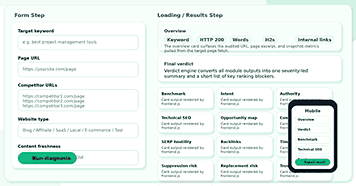
The SEO Never Rank Diagnosis tool instantly reveals the reasons why your page isn’t ranking. Enter a keyword and URL for a practical, targeted diagnosis of your live page.
Who Should Use This Tool?
This tool is designed for site owners, content teams, consultants, SaaS marketers, affiliate publishers, local businesses, e-commerce operators, and tool builders who are seeking clear reasons why a page isn’t ranking. It replaces guesswork with direct, page-specific guidance.
On-Page SEO Focus and Unique Value
The SEO Reality Diagnosis Tool is based on on-page SEO. It gives clear and simple information that readers and search engines can follow. And it’s not as feature-rich as full SEO suites. Instead, it’s about diagnosing why some pages fail to rank for their target keywords and providing clear, actionable, diagnosis-only advice.
What Users Enter Before The Analysis Starts
Purpose of Each Input
Website Type and Freshness Significance
Why this tool exists
How The SEO Never-Rank Diagnosis Tool Provides Clarity
Communicating Unique Product Value
How The SEO Never-Rank Diagnosis Tool Reads A Page
How The Tool Processes HTML and Finds Key Details
Why This Process Matters
How Competitor Benchmarking Works
Gap Analysis with Competitors
Benefits for Content Teams
How The Technical SEO Engine Works
The Technical SEO module turns page signals into a measurable score and a list of first actions to take. It finds direct indexability problems, such as noindex directives and cross-domain canonical references.
The module also checks the quality of the HTTPS settings, the length of the title tag, the relevance of the meta description, the document structure, the canonical directives, and the match of the keywords with the content.
Clarifying Technical SEO Priorities
This bit of information is helpful, as many users understand the importance of technical SEO, but not many know how to differentiate between critical issues and less important concerns. The SEO Never Rank Diagnosis Tool enables you to easily separate the major blockers from the lower-priority improvements and show the differences more clearly than any generic checklist.
Empowering Users to Take Action
Reviewing the output makes it easier to prioritize what to fix first. Instead of working through a long generic checklist, each result is tied to a specific page signal — so the action is clear from the start.
How SEO Never-Rank Diagnoses Content Futility and Opportunity Mapping
Opportunity Map: Identifying Addressable Gaps
Honest Diagnosis Over Generic Advice
What The Page Snapshot Tells The User
Immediate Issue Detection
Transparency and User Trust
This transparency is one of the clearest benefits of the tool. People prefer to see proof that an audit uses real page data, not assumptions or cached approximations. That trust starts with the first card in the report.
How The Search Intent Check Works
Detecting Intent Mismatch
Importance Of On-Page SEO
How authority, backlink pressure, and SERP hostility are framed
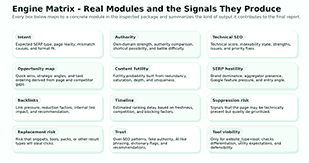
Authority, Backlinks, and SERP Hostility Explained
Why External Factors Matter
How suppression risk, replacement risk, and trust are explained
Replacement Risk and Zero-Click Threats
Trust Module: Assessing Credibility
The trust module is used to measure a page’s trustworthiness by users and search engines. It indicates content that is too generic, doesn’t have author or source cues, or lacks the depth and proof to compete for search results with more authoritative pages.
Why SEO Reality Diagnosis Tool Isn’t Like the Others
- The SEO Reality Diagnosis Tool will give you a clear answer, not some feel-good summary or vanity score.
- It tells you what the tool actually does, not what AI might do.
- Saves you time: It tells you when one page is optimized enough and where to put your attention.
- It translates SERP behavior patterns into concrete, actionable steps you can take.
To get the most from the tool, enter your page URL, your target keyword, and up to three competitor URLs. The report will show you whether your content intent, format, and trust signals match what Google is currently rewarding for that keyword.
Why SEO Never Rank Diagnosis Pages Get an Extra Viability Check
Looking at Tool-Specific Ranking Factors
Telling Content Pages Apart from Tool Pages
What The Final Verdict Means
Significance for Founders and Marketing Professionals
Clear Next Steps for Users
How the report helps on-page SEO work
Supporting Rankability Through Focused Edits
Honest Product Positioning
What The Tool Is Not
The SEO Never Rank Diagnosis Tool is not a Google tool, site crawler, backlink index, or keyword database. It doesn’t guarantee rankings or automatically generate long articles.
Page-Level Accuracy and Trust
The tool is very accurate at the page level. The system makes a focused ranking analysis when you enter just one keyword and URL. This exact link between promise and delivery creates trust.
Clarity Leads to Value and Conversion
Greater clarity breeds trust and visibility in search. If users know what a tool can do and what it can’t, they can quickly figure out if it’s useful.
How users should use the output
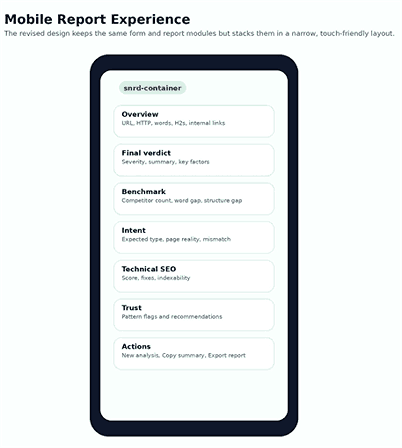
Keep your workflow simple: run your page through the tool with your target keyword, add up to 3 competitor URLs that align with your goals or already perform well, and review the overview, benchmark, intent, technical, and verdict cards before making any changes to your page.
Deciding Correct Actions from the Report
The report spells out clear guidance on where to start. Pages with formatting problems need a structural rethink before anything else. Technical blockers like indexability errors, missing metadata, or broken canonical tags should be cleared early, since they stop the rest of your work from having any effect. When content is the weak point, go deeper on the topic and back up your claims with real sources or examples. If the keyword you’re targeting is dominated by major brands or heavy competition, the smarter move is often to narrow down to a more specific phrase—one where your page has a genuine chance to compete.
Every section of the report connects directly to an action. Whether the issue is a structural problem, thin content, a missing trust signal, or a keyword mismatch, the output points you toward the right solution.
What Makes This Tool Easy to Understand
Benefits of Transparent Language
Clear, direct language is better than SEO jargon because it tells users and search engines exactly what the tool does. It’s easier for search engines to understand when a page is about its features. Clear explanations answer directly the one main question that the user is asking: what does this tool do for me?
Matching Tool Content with Real Functionality
Final Summary
Benefits for Users and Teams
Frequently asked question
Does this tool write SEO content automatically?
No. The tool highlights problems with rankings, whether it be content, structure, trust, technical setup, or strategy. But it doesn’t write articles. When a tool is honest about what it does, users know exactly when and how to apply it.
Can it audit any public webpage?
Yes, the SEO Never Rank Diagnosis Tool can analyze any public web page with a readable HTML URL. This means the address points to a web page that displays standard web page code that browsers can read. If a page is blocked, broken, not in HTML format (e.g., a PDF or image), or unavailable, the tool will tell you it can’t retrieve the content. Only content that can be viewed and loaded as an HTML web page is considered.
Why are competitor URLs useful?
Competitor URLs allow the tool to build a benchmark from pages that are already ranking for your keyword. It compares content depth, heading count, internal link volume, and media usage across those pages. That comparison shows where your page falls short and what the ranking bar actually looks like.
Does this information help the calculator and tool pages?
Yes. The tool works well for calculator and tool pages. The Tool Viability module assesses the tool’s uniqueness and ease of use, comparing its features to those of other tools offered by other providers.
Can the tool substitute a full SEO strategy?
No, this tool doesn’t replace a full-blown SEO strategy. It analyzes one page at a time to help guide rewriting decisions, redesign choices, or keyword targeting.