
International Merit Calculator for Smarter Admission Planning
Confidently figure out your admission merit
Formula source
What we think
- Different schools or programs may have different ways to figure out merit.
- Some people place different levels of importance on school grades, college grades, entrance exams, or interview scores.
- Cutoffs, percentages, and comparisons are only meant to help you.
- The official admission body makes the rules for things like seat reservations.
- They always decide who gets in based on their rules and how many seats are open.
Take note
When Should You Use an International Merit Counter
This tool is useful at different points in time:
First, before you apply to colleges
While looking at the requirements for admission
Just after getting the test results
During planning for school
It isn’t an official institutional calculation; it’s just a quick way to get a sense of something.
Use One Merit Calculator for All Admission Systems
Help for more than one nation
Understanding Percentages of Merit
The merit percentage is a score that schools use to narrow down the list of candidates.
It’s not always based on just one score. Instead, schools might use weighted factors to determine merit, such as
| Part | Weight Example |
|---|---|
| Old Tests | 40% |
| Test for Entry | Half |
| Interview/Other | 10% |
Understanding how merit works can benefit you:
Set goals for admissions that are realistic.
Make the weak areas stronger
Get ready to do it again or change it.
Look at the requirements of different schools.
Examining the following will help you learn more about how academic scoring systems operate:
How the International Merit Calculator Works
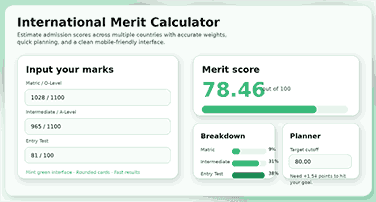
This guide makes a difficult process easier by breaking it down into simple steps. You choose the country model, type in your grades, check the weightage, and get a new merit score right away. The tool also breaks down your score so you can see which part is the most important.
That visibility is very important. A good admission merit calculator should do more than just give you a number. It should show you why that number changed, how close you are to your goal, and what you can do next to improve.
The online calculator can also be used to quickly talk to other people. You can try out different scores, look at candidate profiles, save a scenario, and export your results all without leaving the main experience. That means the tool is useful for more than just quick checks; it’s also useful for making big plans.
In a matter of seconds, you can enter your grades.
You don’t need to know a lot to start. You just put in the scores that are right for your country’s model, like O-Level or matric marks, intermediate or A-Level marks, GPA, standardized test scores, or other academic inputs.
The fields stay clean and easy to read. That makes it easier for people who are using it for the first time and makes the page feel more welcoming to students, parents, counselors, and education consultants.
Change the weight without losing accuracy.
One of the best things about this International Merit Calculator is that you can change the weight. The tool can quickly work with any kind of model a student wants to try, whether it’s one that focuses on schoolwork, one that focuses on tests, or one that is more balanced.
The score makes sense because the calculator uses normalized weights, which is more important. This means that even if users change the raw percentages, the final result will still follow a valid 100-point structure. Many of the simpler tools don’t work here. They show changes in weight visually, but they don’t use them right in the score.
Plan around the target cutoffs
A smart merit score calculator should do more than just give you a score. It should help students do something about that outcome. This calculator has a planning layer that lets people set a deadline and see how close they are to reaching it.
That feature changes the page from a static utility to a helpful tool for planning admissions. Instead of “What is my score?” users can now ask, “How much do I need to improve?” That change makes people more interested and makes the content a lot more useful.
Who Should Use This International Merit Calculator?
High school students, college applicants, parents, teachers, education counselors, and academic advisors will all find this page useful. Anyone who needs to quickly and easily find out how good a candidate is for admission can use it without worry.
It helps students who are thinking about more than one way to get into college. A multi-country merit calculator can help you compare local universities, international options, or a mix of both if you’re not sure which to look at.
Students who like to make plans based on data will also benefit. The score breakdown, scenario tools, and target planner can help you learn more than just a single line of information.
Step-by-Step Guide to Using the International Merit Calculator
Pick the country model that best fits the admission system you want to look at first. The form on this page updates itself so that you only see the fields that are most important to that path.
Then, fill in the blanks with your grades or scores. Add exact numbers if you have them. If you’re still not sure how things will turn out in the future, make your best guess and then try out other options later.
After that, check the weightage settings. You can use the default model or choose a different one, depending on how you like to plan. Change the weights by hand if you want more control, and let the calculator figure out the scoring system for you.
Now check out your merit score, breakdown, and planner area. If you want to reach a higher goal, set a cutoff and look at the gap. You can then save the result as a scenario, compare it to another profile, or export it to look at later.
Why Accuracy Is Important When Planning Admissions
Small math mistakes can change how a student thinks about their chances. A tool is misleading if it doesn’t take into account country-specific inputs, doesn’t normalize scores, or uses the wrong weightage. That can cause students to make bad decisions, be too sure of themselves, or worry for no reason.
Preparation becomes easier when you can accurately predict merit. It helps students decide where to apply, what they need to work on, and how to split up their study time. When accuracy goes up, confidence goes up.
This is even more important when people are applying. Students often have to choose between many options in a short amount of time. They need a tool that works quickly and still follows the rules for scoring. That’s why a professional merit calculator has to be quick, clear, and correct all at the same time.
Why This Calculator Is Better Than Other Merit Tools
Real calculations of the normalized weight
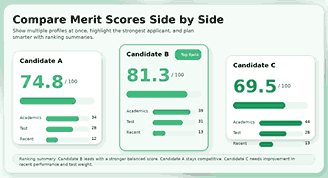
Compare several profiles by lining them up side by side.
Save scenarios to help you make better decisions.
Use the target planner to set goals that you can reach.
You can easily send and receive your results.
Cleanly use your phone.
How to Raise Your Merit Score Before Applications Open
Improvement starts with clarity. If you do not know which component drives your merit score, you cannot improve efficiently. This calculator solves that by showing where your strongest and weakest areas sit inside the final score.
If your academic component already looks strong, focus on the entry test or the most heavily weighted section. If your recent academic performance has the largest weight, prioritize course consistency, exam preparation, and score stability. The best strategy depends on the weighting model, which is exactly why a good merit calculator matters.
Don’t just try to get the best numbers. Test out real-life situations to see how you can get better. Add one score range at a time and see how the total merit changes. That keeps your plans real and stops you from getting your hopes up.
Short, repeated review works better than last-minute panic. Use the tool weekly or after every major test update. That habit turns the calculator into a smart progress tracker.
Common Errors Students Make When Calculating Merit
The common error is to mix up raw scores and percentages. Students often enter grades as percentages or change grades without looking at the base range. That small mistake can change the outcome right away.
Another mistake is using old formulas from random blog posts or comment sections. Different schools have different structures, and the rules for getting in change. It is best to use a calculator that makes it easy to see the country models and weight settings.
Almost all students don’t consider how weight affects things. They think that all inputs are equally important, but that’s not always true. In competitive admissions, one heavily weighted part can make a much bigger difference in the outcome than you might think.
The last mistake is to trust your memory instead of saving situations. Students test one guess, then forget it later, losing important planning information. Saving scenarios fixes that problem and makes it much easier to compare things over time.
Why students like a merit calculator that can be used in more than one country
The pupils can’t get in the same way anymore. Many people consider both local and international options simultaneously. A merit calculator that can do a lot of things is better than one that can only do one thing.
Students who can switch quickly between models make better decisions. They understand how their specific characteristics work across different systems, which helps them identify the best opportunities for success.
This also helps you calm down. Users don’t have to deal with many rules and calculators; they stay on one well-organized platform. That clarity makes it easier to deal with the whole process of getting in.
Disclaimer for the International Merit Calculator
Enjoy the full functionality of International Merit Calculator on your phone

Mobile-friendly pages should not resemble smaller versions of the original. It should still let people enter grades, look at scores, compare situations, and save results without any problems.
The card-based design of this calculator is good for small screens. The inputs are still easy to read, the actions are still easy to find, and the content still feels clean. This is important because mobile traffic is often the most significant factor in how students search for information and what they do in school.
For higher conversions from search, you need more than just keywords. You need a page that people can actually use. A smooth mobile experience helps you get there right away.
Questions That People Ask About International Merit Calculation
What is an international merit calculator?
The international merit calculator is an online tool that helps students estimate how well they would perform in admissions in different countries or academic systems. It takes grades, test scores, and GPA and combines them to produce an overall merit score.
How trustworthy is this merit calculator?
The calculator is supposed to help you plan by giving you a good idea of how much time and money you will need based on the country model and weightage structure you choose. It works best when people enter the correct numbers and look at the score breakdown rather than just one number.
Can I view more than one student profile at a time?
Definitely, in compare mode, you can look at more than one profile at a time. This helps students, parents, and counselors understand how small score changes can affect the final merit outcome.
Are the weightage settings modifiable?
Sure. You can use the default weights or presets or change them yourself. The calculator normalizes the score structure so the final result makes sense.
Is it possible to use this calculator on your phone?
Yes. People can easily use their phones and tablets to check scores, review planners, and save scenarios because the interface works well on mobile screens.
Can I save or export my result?
Of course. You can save, export, and import files with this tool. It is easier to go back and review old calculations and share the results with others.